Vane Data: From Multimodal Files to Queryable Data
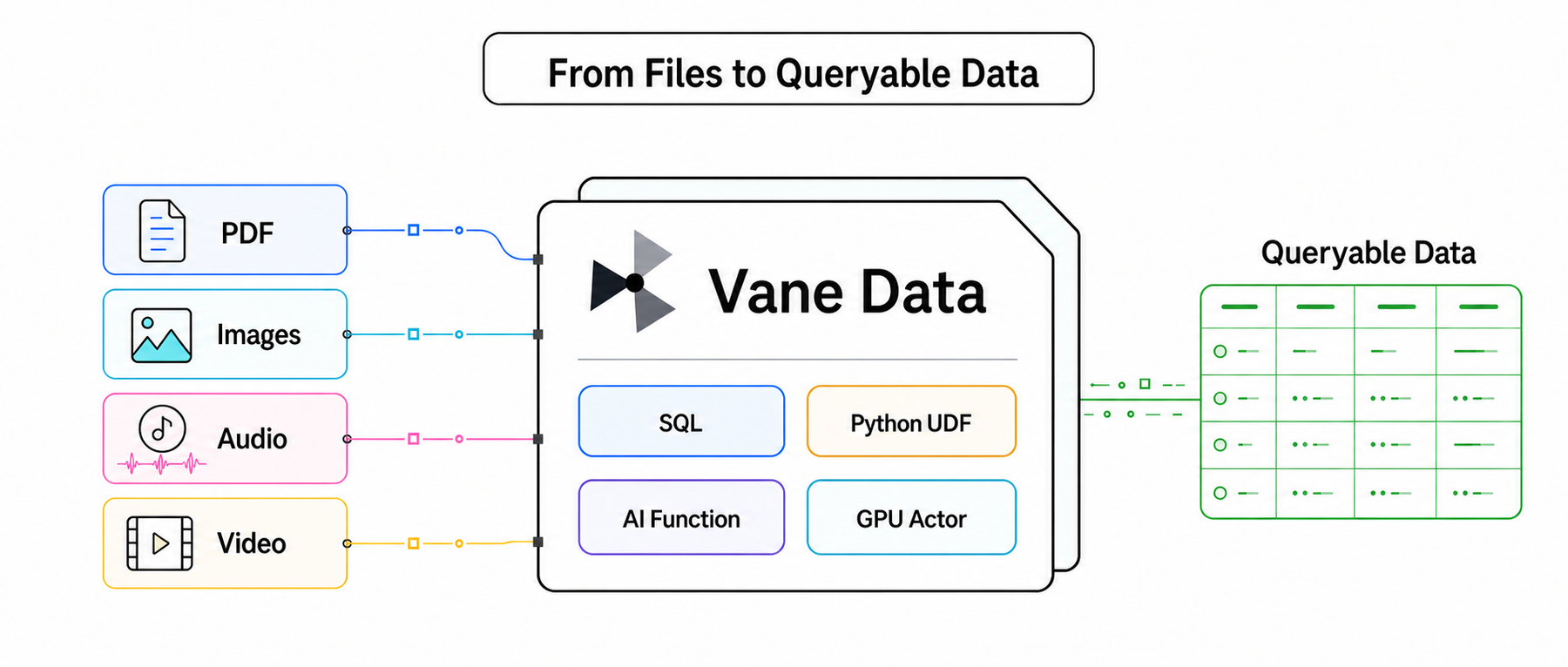
AI applications often need to process PDFs, images, audio, and video. Before they enter a data pipeline, PDFs must be split into pages, images decoded, audio resampled, and video expanded along its timeline, while filenames, page numbers, and frame indices remain attached as location metadata. Using these four file types, this article shows how Vane Data centers the workflow on a Relation—a multimodal dataset—to connect file expansion, batch processing, model inference, queries, and writes, turning raw files into queryable data.
This article uses conceptual pseudocode to show how Vane Data organizes multimodal processing workflows. It omits the implementation details of tools such as PyMuPDF, image decoders, Whisper, and YOLO. Related runnable examples appear at the end.
SQL and Python: Two APIs, One Data Pipeline
In Vane Data, file contents, business fields, and processing results all live in a Relation. SQL is well suited to column expressions, filtering, and AI Function calls. The Python API is better suited to integrating existing processing libraries, performing one-to-many expansion, and configuring runtime resources such as Actors and GPUs.
Parsing, decoding, and format conversion can be implemented with stateless UDFs. Models such as Whisper and YOLO, which should not be loaded repeatedly, can be wrapped in stateful UDFs: an Actor initializes the model once and then processes multiple batches. AI Functions handle Prompts and Embeddings.
The following four examples show how PDFs, images, audio, and video become queryable Relations. The table summarizes each pipeline, its main outputs, and how the code is organized.
| Example | Typical pipeline | Main output | Code structure |
|---|---|---|---|
| PDF → text chunks → Embedding / semantic fields | One text chunk per row, retaining its source, page number, chunk index, and text while adding embedding, topics, and chunk_summary | SQL reads files and generates vectors and semantic fields; Python flat_map expands pages and text chunks | |
| Image | Image BLOB → batch decoding and inspection → usable images → vision Prompt → STRUCT fields | One image that passed inspection per row, including file information, dimensions, an English summary, and model-reported confidence | SQL calls inspect_image to inspect and filter images, then uses AI_PROMPT to generate structured descriptions; Python registers the UDF |
| Audio | Audio bytes → decoding and 16 kHz resampling → Whisper input features → model inference → transcript | One audio item per row, retaining its path, language, and business fields while adding a Chinese transcription | SQL CTEs connect the batch UDFs; Python registers stateless UDFs and an Actor that reuses the Whisper model |
| Video | Video file → frames → per-frame detections → objects → cropped images | One detected object per row, including video and frame location, class, confidence, bounding box, and a cropped PNG BLOB | Python uses VideoFrameSource, map_batches, and a GPU Actor for frame reading, detection, object expansion, and cropping |
PDF: Split Documents into Text Chunks and Generate Retrieval and Semantic Fields
Typical pipeline: PDF → pages → text chunks → Embedding / semantic fields
The PDF example processes a collection of text-based documents to produce searchable text chunks. Each chunk carries its file source, page number, and chunk index, so a retrieval result can lead directly back to the original text. Vectors support similarity search, while topics and summaries support filtering and result presentation.
The example uses read_blob to read the files and PyMuPDF to extract text page by page. Two Python flat_map calls expand the PDFs first into pages and then into text chunks. The chunk size is aligned with the Embedding model's tokenizer and retains a moderate overlap. SQL then uses AI_EMBED to generate the vector field.
Embedding and Prompt can process the same text-chunk Relation. The embedding field supports similarity search, while topics and chunk_summary support filtering and result presentation.
import vane


# These placeholders represent PyMuPDF and tokenizer-based helpers.
# See the related runnable example linked at the end for a complete PDF pipeline.
EMBEDDING_MODEL = "sentence-transformers/all-MiniLM-L6-v2"
MAX_CHUNK_TOKENS = 240
CHUNK_TOKEN_OVERLAP = 32


# flat_map callable: take one PDF row and yield one row per page.
def extract_pages(row):
    for page_number, text in parse_pdf(bytes(row["content"])):
        yield {
            "source": row["source"],
            "size": row["size"],
            "page_number": page_number,
            "text": text,
        }


# flat_map callable: take one page row and split it into overlapping tokenizer-aligned chunks.
def split_chunks(row):
    for chunk_index, text in enumerate(
        split_text_by_tokens(
            row["text"],
            model=EMBEDDING_MODEL,
            max_tokens=MAX_CHUNK_TOKENS,
            overlap_tokens=CHUNK_TOKEN_OVERLAP,
        )
    ):
        yield {
            "source": row["source"],
            "size": row["size"],
            "page_number": row["page_number"],
            "chunk_index": chunk_index,
            "text": text,
        }


# flat_map changes the row count, so declare the output schema for each stage.
PAGE_SCHEMA = {
    "source": vane.sqltypes.VARCHAR,
    "size": vane.sqltypes.BIGINT,
    "page_number": vane.sqltypes.INTEGER,
    "text": vane.sqltypes.VARCHAR,
}
CHUNK_SCHEMA = {
    **PAGE_SCHEMA,
    "chunk_index": vane.sqltypes.INTEGER,
}


# The same connection carries both SQL queries and subsequent Python Relation operations.
con = vane.connect()


# read_blob loads file metadata and binary content into one Relation.
pdfs = con.sql("""
    SELECT filename AS source, size, content
    FROM read_blob('/data/pdfs/*.pdf')
""")


# The first flat_map call expands one PDF row into multiple page rows.
pages = pdfs.flat_map(extract_pages, schema=PAGE_SCHEMA)


# The second flat_map call expands one page row into multiple text-chunk rows.
chunks = pages.flat_map(split_chunks, schema=CHUNK_SCHEMA)


# Once the chunks form a Relation, switch back to SQL and append a vector field with AI_EMBED.
embedded = chunks.query(
    "chunks",
    """
    SELECT
        *,
        -- Generate a vector for each text chunk while retaining its location fields.
        AI_EMBED(
            text,
            provider := 'transformers',
            model := 'sentence-transformers/all-MiniLM-L6-v2',
            options := struct_pack(
                device := 'cpu',
                batch_size := 32
            )
        ) AS embedding
    FROM chunks
    """,
)


# Continue on the same Relation with AI_PROMPT to generate queryable semantic fields.
result = embedded.query(
    "embedded",
    """
    WITH enriched AS (
        SELECT
            *,
            -- AI_PROMPT returns STRUCT(topics, summary), or NULL on failure.
            AI_PROMPT(
                text,
                return_format := json '{
                    "type": "object",
                    "properties": {
                        "topics": {
                            "type": "array",
                            "items": {"type": "string"}
                        },
                        "summary": {"type": "string"}
                    },
                    "required": ["topics", "summary"],
                    "additionalProperties": false
                }',
                system_message :=
                    'Extract the main topics from the text chunk and summarize it in one sentence.',
                provider := 'vllm',
                model := 'Qwen/Qwen2.5-7B-Instruct',
                on_error := 'ignore',
                options := struct_pack(
                    max_tokens := 128,
                    temperature := 0.0
                )
            ) AS metadata
        FROM embedded
    )
    SELECT
        source,
        size,
        page_number,
        chunk_index,
        text,
        embedding,
        -- Expand the STRUCT directly for downstream SQL filtering and presentation.
        metadata.topics AS topics,
        metadata.summary AS chunk_summary
    FROM enriched
    """,
)


# write_parquet materializes the entire Relation pipeline.
result.write_parquet("/tmp/pdf_chunks_enriched.parquet")
write_parquet materializes the entire Relation pipeline. This example covers only text-based PDFs; scanned, password-protected, or corrupted files need separate handling.
Each output row represents one text chunk with the following fields:
| Field | Type | Purpose |
|---|---|---|
| source | VARCHAR | Locate the original PDF |
| size | BIGINT | Retain the original file size |
| page_number | INTEGER | Locate the original page |
| chunk_index | INTEGER | Record the chunk's position within the page |
| text | VARCHAR | Store the text sent to the model |
| embedding | FLOAT[384] | Support downstream vector indexes and similarity queries |
| topics | VARCHAR[] | Provide a topic list for filtering text chunks |
| chunk_summary | VARCHAR | Provide a text-chunk summary for result presentation |
Images: Filter Usable Images and Generate Structured Descriptions
Typical pipeline: Image BLOB → batch decoding and inspection → usable images → vision Prompt → STRUCT fields
The image example focuses on structured descriptions. Image inspection is implemented in Python and registered in advance as a SQL UDF. SQL calls the function to obtain a STRUCT containing the width, height, and is_usable flag, then routes images through a WHERE clause. Records that fail inspection can form a separate Relation, while images that pass continue to the vision model. AI_PROMPT generates a STRUCT(summary, model_confidence) that follows the supplied schema, and SQL constrains the fields and their types.
The example processes five images and calls gpt-4o-mini through the OpenAI Provider. The inspect_image function defines the input and output contract of the batch UDF, while inspect_image_blobs implements the underlying image-decoding logic.
import pyarrow as pa
import vane


# The UDF returns one STRUCT per image, with all three fields directly accessible from SQL.
INSPECTION_TYPE = pa.struct([
    pa.field("width", pa.int32()),
    pa.field("height", pa.int32()),
    pa.field("is_usable", pa.bool_()),
])


# Define a stateless batch UDF. Vane passes two Arrow arrays per batch.
# The function returns a StructArray of the same length, and batch_size controls each batch.
@vane.func.batch(return_dtype=INSPECTION_TYPE, batch_size=32)
def inspect_image(image, minimum_side):
    return inspect_image_blobs(image, minimum_side)


con = vane.connect()


# Register the Python UDF on the current connection under the SQL name inspect_image.
# parameters declares its input signature as (BLOB, INTEGER).
vane.attach_function(
    inspect_image,
    alias="inspect_image",
    connection=con,
    parameters=["BLOB", "INTEGER"],
)


# Read image files into a Relation containing metadata and BLOB values.
images = con.sql("""
    SELECT filename, size, content AS image
    FROM read_blob('/data/images/*')
""")


# Call the registered Python UDF in a SQL projection. The value 64 is the minimum short side.
inspected = images.query(
    "images",
    """
    SELECT
        *,
        -- Each row receives a STRUCT(width, height, is_usable).
        inspect_image(image, 64) AS inspection
    FROM images
    """,
)


# Route on the UDF's is_usable field in SQL and send only usable images to the model.
result = inspected.query(
    "inspected",
    """
    WITH described AS (
        SELECT
            filename,
            size,
            inspection.width AS width,
            inspection.height AS height,
            -- Call a vision Prompt for each image that passed inspection and require a fixed STRUCT.
            AI_PROMPT(
                'Describe the main subject in the image and provide a confidence score from 0 to 1.',
                image,
                return_format := json '{
                    "type": "object",
                    "properties": {
                        "summary": {"type": "string"},
                        "model_confidence": {"type": "number"}
                    },
                    "required": ["summary", "model_confidence"],
                    "additionalProperties": false
                }',
                system_message := 'Return only an English-language result that matches the requested structure.',
                provider := 'openai',
                model := 'gpt-4o-mini',
                on_error := 'ignore',
                options := struct_pack(
                    use_chat_completions := true,
                    max_output_tokens := 128,
                    temperature := 0.0
                )
            ) AS answer
        FROM inspected
        WHERE inspection.is_usable
    )
    SELECT
        filename,
        size,
        width,
        height,
        -- Expand the model-returned STRUCT into regular queryable columns.
        answer.summary AS summary,
        answer.model_confidence AS model_confidence
    FROM described
    """,
)


# Materialize the preceding UDF inspection and model calls.
result.write_parquet("/tmp/image_descriptions.parquet")
The results for the five images are:
| Filename (filename) | Content summary (summary) | Model-reported confidence (model_confidence) |
|---|---|---|
| n02094114_4707.JPEG | A fluffy puppy is running across the grass | 0.95 |
| n02398521_13903.JPEG | NULL | NULL |
| n01784675_1352.JPEG | A close-up of a centipede, showing its segmented body and long, slender legs | 0.95 |
| n02790996_10925.JPEG | A man is bench-pressing in a gym | 0.95 |
| n02018207_15713.JPEG | NULL | NULL |
NULL means the image passed decoding and dimension checks, but the Prompt stage did not produce a valid structured result. The cause may be a Provider error or an output validation failure; it does not mean that the image itself is unusable. model_confidence can assist with ranking.
Audio: Transcribe in Stages and Reuse the Whisper Model
Typical pipeline: audio bytes → decoding and 16 kHz resampling → Whisper input features → model inference → transcript
This example uses Mandarin audio. The samples vary in encoding, sampling rate, and duration, so they must be decoded and resampled to 16 kHz before being sent to Whisper. The query uses a sequence of SQL CTEs and a final projection to make each stage explicit: extract the audio bytes, decode and resample them, generate input features, run Whisper, and decode the output tokens into Chinese text. The final four stages call registered batch UDFs. Model inference explicitly sets language="zh" and task="transcribe" so short clips do not depend on automatic language detection.
Stateless batch UDFs provide decoding, feature generation, and token decoding. The WhisperTranscriber Actor backs the whisper_transcribe_zh SQL UDF and reuses one model instance throughout its lifetime. SQL organizes these stages.
import vane


MODEL_ID = "openai/whisper-tiny"
SAMPLING_RATE = 16000
BATCH_SIZE = 128
NUM_GPU_ACTORS = 1


# Declare the types of the three intermediate results for both UDF returns and SQL parameters.
FEATURE_MELS = 80
FEATURE_FRAMES = 3000
RESAMPLED_AUDIO_TYPE = vane.list_type(vane.sqltypes.FLOAT)
INPUT_FEATURES_TYPE = vane.tensor_type(
    vane.sqltypes.FLOAT,
    (FEATURE_MELS, FEATURE_FRAMES),
)
TOKEN_IDS_TYPE = vane.list_type(vane.sqltypes.INTEGER)


# These placeholders represent audio decoding, feature construction, and token decoding.
# See the related runnable example linked at the end for a complete audio pipeline.


# First stateless batch UDF: decode audio BLOBs in different formats into 16 kHz waveforms.
@vane.func.batch(return_dtype=RESAMPLED_AUDIO_TYPE, batch_size=BATCH_SIZE)
def decode_resample_16k(audio_bytes):
    return decode_and_resample(audio_bytes, sample_rate=SAMPLING_RATE)


# Second stateless batch UDF: convert waveforms into the fixed-shape features Whisper expects.
@vane.func.batch(return_dtype=INPUT_FEATURES_TYPE, batch_size=BATCH_SIZE)
def prepare_whisper_features(waveform):
    return build_whisper_features(
        waveform,
        model=MODEL_ID,
        sample_rate=SAMPLING_RATE,
    )


# Define a stateful Actor UDF. Each Actor uses one GPU and processes multiple batches.
@vane.cls.batch(
    actor_number=NUM_GPU_ACTORS,
    gpus=1.0,
    return_dtype=TOKEN_IDS_TYPE,
    batch_size=BATCH_SIZE,
)
class WhisperTranscriber:
    def __init__(self):
        # __init__ runs once when the Actor is created, avoiding a model load for every batch.
        self.model = load_whisper(MODEL_ID, device="cuda")


    def __call__(self, input_features):
        # __call__ processes one feature batch and explicitly selects Chinese transcription.
        return transcribe_to_token_ids(
            input_features,
            model=self.model,
            language="zh",
            task="transcribe",
        )


# Third stateless batch UDF: decode the model's token IDs into Chinese strings.
@vane.func.batch(return_dtype=vane.sqltypes.VARCHAR, batch_size=BATCH_SIZE)
def decode_whisper_tokens(token_ids):
    return decode_token_ids(token_ids, model=MODEL_ID)


con = vane.connect()


# Register the decoding and resampling UDF with the SQL signature decode_resample_16k(BLOB).
vane.attach_function(
    decode_resample_16k,
    alias="decode_resample_16k",
    connection=con,
    parameters=["BLOB"],
)


# Register the feature-generation UDF, matching its input type to the previous stage's return.
vane.attach_function(
    prepare_whisper_features,
    alias="prepare_whisper_features",
    connection=con,
    parameters=[RESAMPLED_AUDIO_TYPE],
)


# Register the Actor instance. Every SQL call reuses the model already loaded in the Actor.
vane.attach_function(
    WhisperTranscriber(),
    alias="whisper_transcribe_zh",
    connection=con,
    parameters=[INPUT_FEATURES_TYPE],
)


# Register the token-decoding UDF, converting INTEGER[] into VARCHAR.
vane.attach_function(
    decode_whisper_tokens,
    alias="decode_whisper_tokens",
    connection=con,
    parameters=[TOKEN_IDS_TYPE],
)


# Read a Parquet Relation containing the audio STRUCT and sample metadata.
source = con.sql("""
    SELECT *
    FROM read_parquet('/data/chinese-speech/*.parquet')
""")


# Connect the registered UDFs through staged SQL CTEs and the final projection.
result = source.query(
    "source",
    """
    WITH audio AS (
        SELECT
            * EXCLUDE (audio),
            -- Extract the raw audio BLOB from the audio STRUCT.
            audio.bytes AS audio_bytes
        FROM source
    ),
    resampled AS (
        SELECT
            * EXCLUDE (audio_bytes),
            -- Stage 1: call a Python UDF to decode and resample the audio to 16 kHz.
            decode_resample_16k(audio_bytes) AS waveform
        FROM audio
    ),
    featured AS (
        SELECT
            * EXCLUDE (waveform),
            -- Stage 2: call a Python UDF to generate Whisper input tensors.
            prepare_whisper_features(waveform) AS input_features
        FROM resampled
    ),
    tokens AS (
        SELECT
            * EXCLUDE (input_features),
            -- Stage 3: call an Actor UDF to run model inference on the GPU.
            whisper_transcribe_zh(input_features) AS token_ids
        FROM featured
    )
    SELECT
        * EXCLUDE (token_ids),
        -- Stage 4: call a Python UDF to decode token IDs into the final text.
        decode_whisper_tokens(token_ids) AS transcription
    FROM tokens
    """,
)


# Write only the business fields and transcript. The write materializes the entire UDF chain.
result.write_parquet("/tmp/chinese_audio_transcriptions.parquet")
Video: Detect Frame by Frame and Extract Objects
Typical pipeline: video file → frame Relation → per-frame detections → object-level Relation → cropped images
Video processing involves a custom data source, contiguous frame tensors, GPU Actor configuration, and batched object cropping. These steps are more direct to express through the Python API, so this section takes a Python-first approach.
The video pipeline changes row granularity twice. VideoFrameSource first expands a video along its timeline into multiple frames, and object detection then expands the objects in each frame into multiple records. source_id, video_path, and frame_index stay attached to every record, so detections can be queried by object fields and traced back to the source video.
An Actor lets Detector reuse the YOLO model. crop_object_batch expands the detection list and crops each bounding box into a PNG.
import vane
from vane.datasource import read_datasource
from vane.datasource.video_reader import VideoFrameSource


# Stateful batch callable: Vane creates and manages the Actor after it is passed to map_batches.
class Detector:
    def __init__(self):
        # Each Actor loads the YOLO model only once during its lifetime.
        self.model = load_yolo("yolo11n.pt", device="cuda")


    def __call__(self, table):
        # __call__ receives one Arrow Table batch and detects objects in all of its video frames.
        return run_object_detection(
            table,
            model=self.model,
            frame_column="frame",
            fields={
                "label": "boxes.cls",
                "confidence": "boxes.conf",
                "bbox": "boxes.xyxy",
            },
            # Retain source fields and frame indices with the detection results.
            pass_through=(
                "source_id",
                "video_path",
                "frame_index",
                "frame",
            ),
        )


# Stateless batch callable: expand each frame's object list into multiple cropped-result rows.
def crop_object_batch(table):
    # A frame may contain multiple objects, so expand it into rows and crop each object.
    return crop_detected_objects(
        table,
        frame_column="frame",
        features_column="features",
        pass_through=("source_id", "video_path", "frame_index"),
        object_column="object",
    )


con = vane.connect()


# VideoFrameSource decodes the videos, and read_datasource organizes the output as a frame Relation.
# Each row represents one frame and carries its source, path, frame index, and frame tensor.
frames = read_datasource(
    VideoFrameSource(
        video_paths,
        height=640,
        width=640,
    ),
    con=con,
)


# The first map_batches call runs Detector. Vane creates a GPU Actor and reuses its model.
detected = frames.map_batches(
    Detector,
    # schema describes every column in the Relation produced by the detection stage.
    schema={
        "source_id": vane.sqltypes.VARCHAR,
        "video_path": vane.sqltypes.VARCHAR,
        "frame_index": vane.sqltypes.BIGINT,
        "frame": FRAME_TYPE,
        "features": FEATURE_LIST_TYPE,
    },
    batch_size=16,
    actor_number=1,
    gpus=1.0,
)


# The second map_batches call runs a stateless function to expand and crop objects on the CPU.
objects = detected.map_batches(
    crop_object_batch,
    # After expansion, each row represents one object and adds a cropped PNG BLOB.
    schema={
        "source_id": vane.sqltypes.VARCHAR,
        "video_path": vane.sqltypes.VARCHAR,
        "frame_index": vane.sqltypes.BIGINT,
        "features": FEATURE_TYPE,
        "object": vane.sqltypes.BLOB,
    },
)


# Select the final output columns explicitly; the crop stage has already dropped the frame tensor.
result = objects.project(
    "source_id, video_path, frame_index, features, object"
)


# write_parquet materializes the preceding read, detection, and crop stages.
result.write_parquet("/tmp/video_objects.parquet")
Each output row represents one detected object:
| Field | Purpose |
|---|---|
| source_id, video_path | Identify the source video |
| frame_index | Locate the decoded frame containing the object |
| features.label | Store the numeric class produced by the model |
| features.confidence | Store the object-detection confidence |
| features.bbox | Store the bounding box in the model input frame's coordinate system |
| object | Store the PNG BLOB cropped from the bounding box |
features.label can be mapped to a class name through YOLO's names. The bbox coordinates refer to the 640×640 model input frame. Mapping them back to the original video also requires the original dimensions and scaling parameters. frame_index is only the decoded frame number; precise playback positioning also requires a timestamp, or PTS and time base.
Conclusion
If summaries, transcripts, and detection results are to support later queries, review, and writes, they cannot become detached from their source files. Filenames, page numbers, frame indices, and business fields stay with the results, so every returned record still reveals where it came from. Vane Data uses Relations to preserve this correspondence, while existing Python tools and models continue to handle parsing and inference. When a model changes or a business rule is added, downstream systems still receive data with a clear schema and explicit provenance instead of having to reconstruct results scattered across scripts and intermediate files. Multimodal files thus become part of routine data processing rather than stopping at a one-off model call.
Get started: