Vane Data + HawDB: Building a Traceable Multi-Video Comparison Workflow
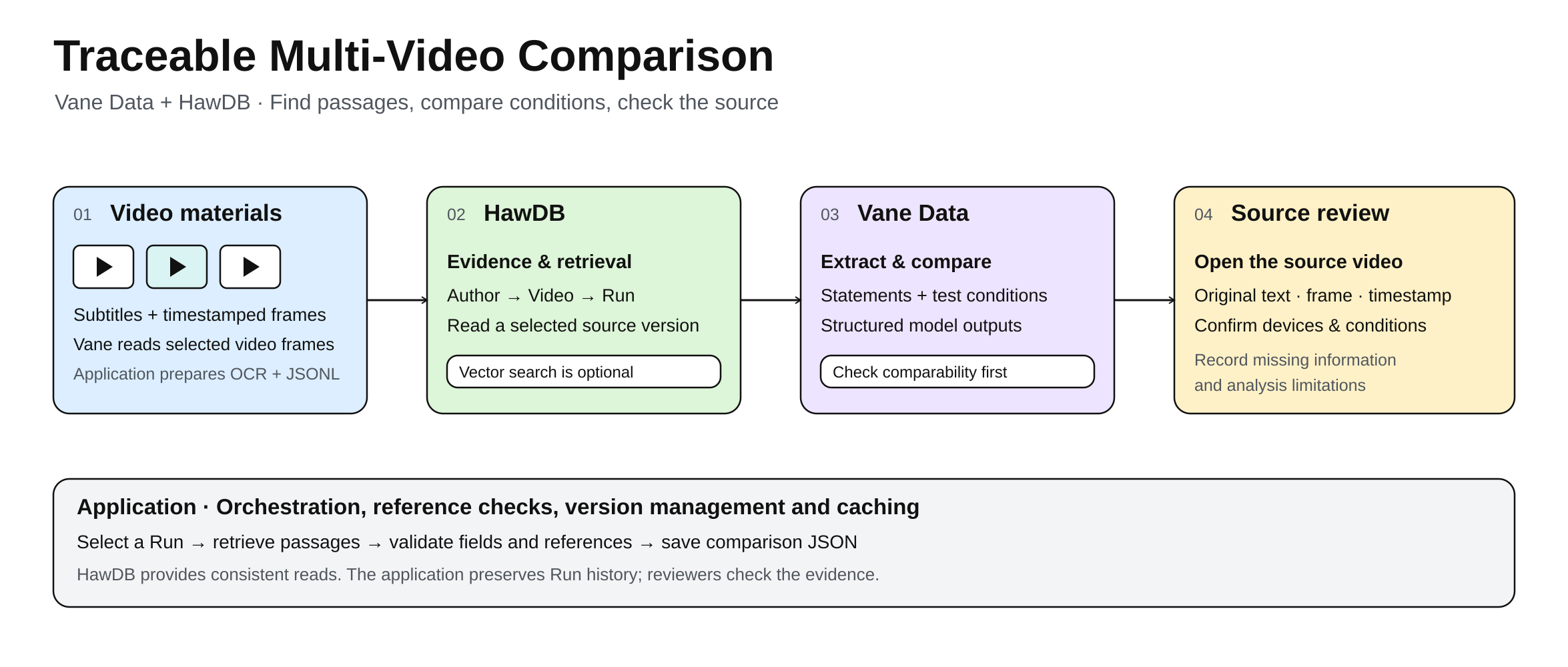
Several videos may cover the same review topic, with different tests and different points of emphasis. To answer a specific question, a viewer needs to find the relevant clips and understand what was tested and under which conditions. This article describes an experiment with Vane Data and HawDB: extract statements from subtitles and frames, check whether the test conditions allow a comparison, and keep links back to the source videos.
The application carries source information alongside subtitles, frames, and model outputs. Vane Data handles media reading and structured model calls; HawDB stores evidence and source relationships. The application coordinates retrieval, reference checks, and version management.
This proof of concept records both the automated results and the corrections made after reviewing the source videos. The demo's summaries and viewing suggestions were prepared in advance. The code excerpts cover the main steps and rely on file paths, candidate passages, and model settings supplied by the application. Database import, service configuration, and full error handling are omitted. Screenshots show the original Chinese interface.
Start with a multi-video comparison
The comparison uses subtitle passages from Mediastorm (影视飓风) and Geekerwan (极客湾). Clips from Zhong Wenze (钟文泽) and He Tongxue (何同学) illustrate frame extraction and differences in test duration.
The demo combines four videos into a viewing guide. A viewer can enter a topic such as battery life or video recording, see what each creator discusses, and open the relevant clips to check the wording and test conditions.
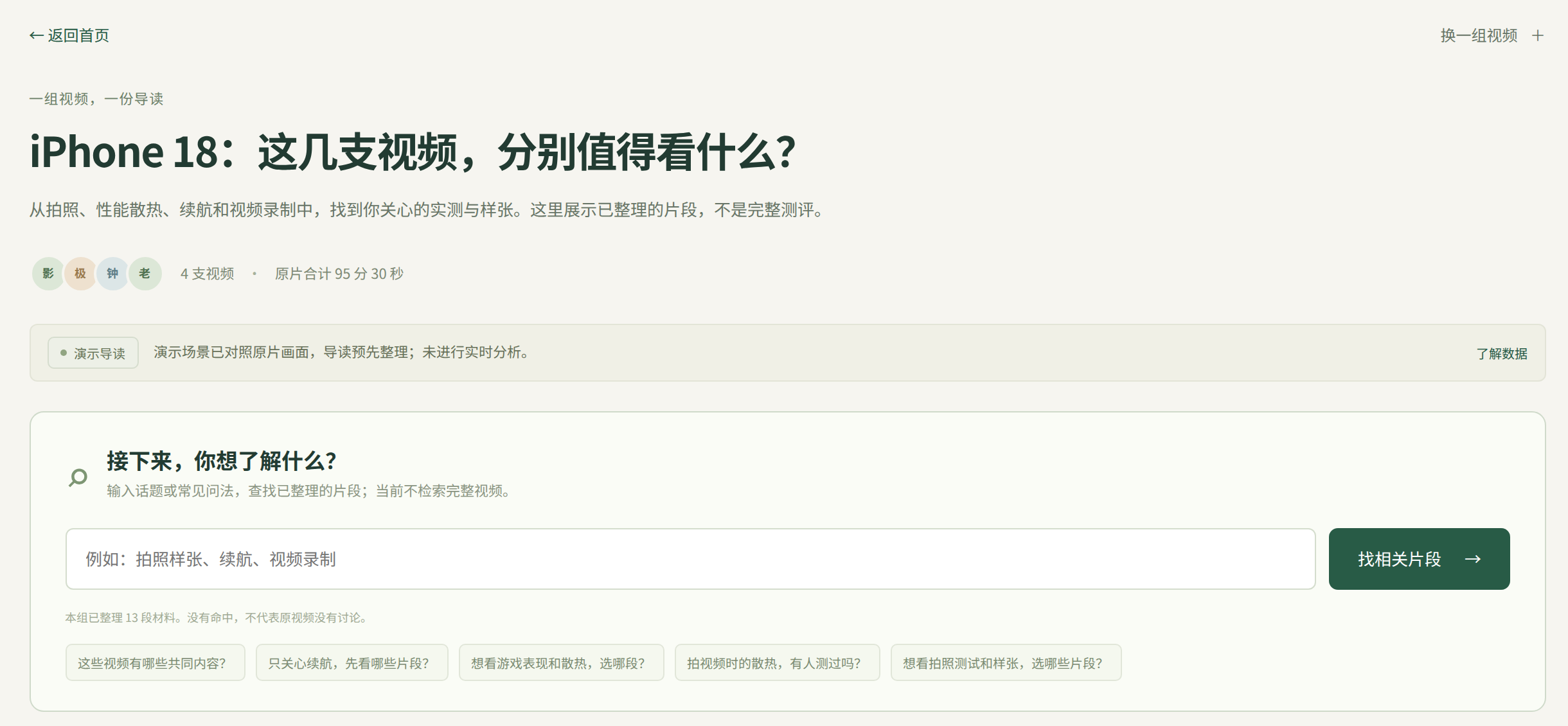
The guide groups summaries and clip links by topic and creator. The fields and comparison labels below come from an actual analysis run. Comparing them with the source shows what was extracted and what was missed.
Can these two reports of iPhone 18 heating be compared directly?
The question used for retrieval and comparison was:
What benefits and trade-offs did the iPhone 18 Pro's cooling improvements bring?
The system found two passages about heat. A later review of the source video showed that one discussed the Duo rather than the iPhone 18 Pro named in the question. A comparison needs to account for which device each clip discusses and how it was tested.
The table records those manual checks. Later sections retain the original automated fields and labels so readers can see what the model missed.
| Source | What the video says | Where to check |
|---|---|---|
| A: Mediastorm | Describes localized heat and holding comfort after about three minutes of 4K60 recording on the Duo, saying it was almost too hot to hold | 12:46–13:16; the on-screen subtitle at 12:47 explicitly names the Duo |
| B: Geekerwan | Describes a front-surface equilibrium temperature of about 44–45°C; the chart labels the iPhone 18 Pro Max at 44.3°C and 17 Pro Max at 45.2°C after a 30-minute high-load stress test | 17:23–17:37; the duration appears in the context starting at 17:08 |
The passages concern different devices and test scenarios. They do not establish a contradiction between the creators' conclusions.
The initial citations were incomplete. A started at 12:53, after the creator had named the Duo. B included the temperature description but missed the preceding mention of a 30-minute stress test. The surrounding subtitles and frames were needed to identify the devices and conditions.
The workflow saves subtitles and frames with their sources, retrieves passages relevant to a question, and extracts statements for comparison. Each result keeps the references needed to return to the cited clips.
How Vane Data and HawDB divide the work
Vane Data is a multimodal data engine for AI workloads. It provides Python and SQL interfaces for processing images, video, and text and passing them to models.
In this PoC, Vane reads video frames and calls models to extract statements and test conditions from subtitles and images, then assess whether the statements can be compared. The application runs these steps and checks the returned fields and citations against the source material.
Vane represents video frames as rows with timestamps. Model calls accept text and image columns and return structured fields. The application uses column selection and Arrow data exchange to pass data between these steps, then validates the extracted conditions, observations, and references.
HawDB is a multimodal embedded database written in Rust, with Cypher queries and transactional reads and writes. The PoC uses it to store video metadata, subtitles, frame analysis records, source relationships, and processing versions. When semantic search is enabled, it also stores text and vectors and runs similarity queries. HawDB runs locally inside the application, without a separate database service.
Graph queries answer which creator, video, and processing run a record came from. Vector search answers which records relate to the current question. Evidence identifiers connect the two so relevant hits still have a traceable source.
| Stage | What the tools provide | What the application controls |
|---|---|---|
| Frame preparation | Vane returns video frames and timestamps in batches | Sampling interval, dimensions, PNG output, and recognition of frame text |
| Semantic search, optional | FastEmbed generates vectors; HawDB stores text, vectors, and source metadata and runs similarity queries | Chunking, index versions, and candidate passage selection |
| Extraction and comparison | Vane organizes text and image inputs and structured outputs | Candidate material, prompts, field checks, and reference validation |
| Storage and source review | HawDB stores evidence and source relationships and provides transactional reads | Source versions, links from citations to video positions, and caching |
Original videos and extracted PNG files stay on the local filesystem. A Rust program imports subtitle and frame analysis records from JSONL into HawDB. The application saves comparison results as JSON, along with the source versions used.
The code below follows the data from frame reading and storage through retrieval, extraction, and comparison.
Build a traceable multimodal data flow
Collect and structure the material
Both A and B have subtitles. The import keeps their original text and start and end times. Videos without subtitles are transcribed with faster-whisper. To read charts and on-screen text, the application samples frames and sends them for image recognition, keeping the frame time and saved image path.
The excerpt reads a frame every five seconds with Vane and saves each as a PNG named by its millisecond timestamp. video_path is a local video path, and output_dir is an empty directory prepared beforehand. No frame_limit is specified here.
from pathlib import Path


from PIL import Image
import vane


con = vane.connect()
height, width = 720, 1280
frames = vane.read_video_frames(
    video_path, image_height=height, image_width=width,
    sample_interval_seconds=5.0,
    connection=con,
)
with frames.select("frame_time", "data").to_arrow_reader(batch_size=4) as reader:
    for batch in reader:
        times = batch.column("frame_time").to_pylist()
        for timestamp, frame in zip(times, batch.column("data"), strict=True):
            pixels = frame.value.values.to_numpy().reshape(height, width, 3)
            path = Path(output_dir) / f"{round(timestamp * 1000)}.png"
            Image.fromarray(pixels).save(path)
frame_time is in seconds. RGB pixels in data are reshaped to the requested dimensions. batch_size=4 means four frames per batch, not a total frame cap; the API's input-size and decoded-frame safety limits still apply. Later excerpts reuse con; call con.close() after processing finishes.
Each selected frame is a row in Vane: frame_time is the time column, and data is the image column. The application selects both and reads pixels in Arrow batches without first collecting every sampled frame from the video.
The image and its timestamp stay in the same row, so later model output can be traced back to a frame time. This example saves PNG files for readers to inspect. Vane handles frame reading, column selection, and batch output.
The application then calls a model through Vane to recognize frame text and records the video source, frame time, and PNG path. These results are stored alongside subtitles for retrieval and comparison. See the read_video_frames documentation for the interface.
Sampling every five seconds can miss a chart that appears briefly. A one- or two-second interval allows closer inspection, at a higher storage and recognition cost. Even then, sampling may miss details.
For example, the system read a frame at 16:48.583 in Zhong Wenze's video as showing 4% battery consumption after an iPhone 18 Pro Max recorded 4K120 video for 15 minutes. Reviewing the video revealed a missing condition: the iPhone 17 Pro in the comparison had 98% battery health, while the other three devices had 100%. The saved image makes that omission possible to check. The battery-consumption figure alone cannot establish cooling performance.
Persist evidence, versions, and source relationships
The application sends subtitle and frame records to a Rust importer for HawDB. Each evidence record stores text or frame analysis results, timestamps, and a content hash. Its run_id links it to a processing version, called a Run. The database also records relationships between creators, videos, and clips.
The PoC reads creator, video, and Run records with this Cypher query from src/corpus.rs, reformatted here:
MATCH (a:Author)-[:PUBLISHED]->(v:Video)-[:PROCESSED]->(r:Run)
RETURN a.payload AS author, v.payload AS video, r.payload AS run
ORDER BY v.id, r.id
LIMIT 1001
PUBLISHED connects creators to videos, and PROCESSED connects videos to runs. The application takes the Run identifiers and reads their evidence:
MATCH (e:Evidence)
WHERE e.run_id IN $runs
RETURN e.payload AS payload
ORDER BY e.run_id, e.start_ms, e.id
SKIP $offset LIMIT $limit
$runs comes from the preceding query; $offset and $limit control pagination. The graph query establishes provenance, and property filters select evidence from those runs. Both use HawDB's query interface. Each record can then be cited together with its creator, video, and processing version.
When subtitles or sampling settings change, the application creates a new Run and keeps the old versions. Before a comparison, it selects completed runs and reads their evidence by run_id. The material from those selected versions forms the source snapshot.
All evidence is read in one HawDB read transaction before retrieval. Each comparison records the source versions it used, so later subtitle updates leave the original evidence available for review.
HawDB's read transaction keeps the source relationships and paginated evidence consistent during the read. Retaining historical versions is the application's responsibility: it decides when to create a Run, how to name it, and how long to keep it.
From retrieval to structured analysis
Retrieve and select candidate passages
For each question, the application searches the stored subtitles and frame records. It groups subtitle cues into passages, adds neighboring cues for context, and attaches frames from the same time interval.
Keyword matching uses titles, subtitles, and recognized frame text. With semantic search enabled, FastEmbed turns material and questions into vectors. HawDB stores the text, vectors, and source metadata and executes similarity queries. The application combines keyword and vector scores, selects and ranks candidate passages, and submits material within the model's input budget.
Each processing version has a corresponding search index that can be rebuilt from original records. A search record contains a chunk identifier, text, vector, and source metadata. Subtitle or frame-text chunks retain evidence_id, video_id, run_id, kind, and start_ms; chunk identifiers combine the evidence identifier with the chunk number, linking hits back to original evidence.
FastEmbed calculates vectors in Python. The Rust importer writes text, vectors, and metadata through HawDB's SearchDocument. HawDB handles vector similarity queries and metadata filters, and the application groups hits into video passages.
Without an embedding model, retrieval uses keywords only. The following query illustrates the optional vector-search path, separately from the comparison run discussed later:
use hawdb::{SearchMode, SearchQueryOptions};
use std::collections::BTreeMap;


let result = index.search_with_options(
    "",
    Some(&query_vector),
    SearchMode::Vector,
    SearchQueryOptions {
        limit: document_count,
        offset: 0,
        rank_window: None,
        fusion_weights: Default::default(),
        metadata_filters: BTreeMap::from([("video_id".into(), video_id)]),
        policy_epoch: None,
    },
)?;
let hits: Vec<_> = result.hits.into_iter()
    .map(|hit| (hit.id, hit.vector_score))
    .collect();
index contains records for the selected versions. FastEmbed generates and normalizes query_vector. The index establishes the data scope, and video_id filters the video. document_count, the total document count in the index, is used here as the return limit to obtain vector scores for application-side ranking with keyword scores.
hits contains chunk identifiers and vector scores. The application looks up the source records and assigns their scores to the corresponding subtitle passages. These become passages, each with an identifier, a list of cues, a time range, and associated frames.
This is SearchMode::Vector; the application combines keyword and vector scores. Rechunking or changing the embedding model requires rebuilding the corresponding index while original evidence and source relationships can remain.
Extract structured statements
The application sends relevant passages to a model through Vane and extracts statements separately for each video. Each statement records one observation or assessment, along with test conditions, devices being compared, uncertainties, and a reference to the supporting subtitle cues. Missing information, including a device that cannot be identified, is left empty.
This subtitle example puts passages and the question into a request table. The fields are specific to the review scenario and can be changed for other topics. The application configures model_options with its provider, model, and execution options; see the Prompt API. con is the connection created earlier.
The returned evidence_id refers to the input passage's id. first_cue and last_cue are one-based cue numbers within that passage, inclusive at both ends. The application uses them to look up the original text and timestamps.
The prompt below translates the Chinese example for readers. A translated prompt may produce different outputs; reproducing the reported run requires its original prompt, model, code, and inputs.
import json
import pyarrow as pa
from pydantic import BaseModel, ConfigDict


class Statement(BaseModel):
    model_config = ConfigDict(extra="forbid")


    evidence_id: str
    first_cue: int
    last_cue: int
    target_model: str | None
    observed_result: str | None
    evaluation: str | None
    comparison_objects: list[str]
    conditions: list[str]
    uncertainties: list[str]


class Statements(BaseModel):
    model_config = ConfigDict(extra="forbid")


    selections: list[Statement]


request = {
    "question": question,
    "passages": [
        {
            "id": passage["id"],
            "cues": [
                [number, cue["text"]]
                for number, cue in enumerate(passage["cues"], start=1)
            ],
        }
        for passage in passages
    ],
}
relation = con.from_arrow(pa.table({
    "text": [json.dumps(request, ensure_ascii=False)],
}))
result = vane.ai.prompt(
    relation, vane.col("text"),
    return_format=Statements,
    system_message=(
        "Extract supported statements relevant to the question, one point per statement. "
        "Preserve the subject, conditions, numeric units, and source uncertainty. "
        "Use only supplied evidence identifiers and locations; do not mix sources. "
        "Set evidence_id to the passage id. Use the passage's subtitle numbers for "
        "first_cue and last_cue, inclusive at both ends. "
        "Return the requested structure, with null or [] for missing information. "
        "Do not add information outside the supplied material."
    ),
    **model_options,
)
extracted = Statements.model_validate(result.select("response").fetchone()[0])
return_format specifies the output structure. Reading response triggers the model call, and the application then checks the result. Video frames are sent separately as image inputs; their identifiers and timestamps locate them in the source video.
con.from_arrow() creates the request table, and vane.col("text") selects the input column. vane.ai.prompt() declares the model call and return structure; the result is read through the table's response column. This example puts a group of candidate passages into one request, so the input table has one row.
The full implementation also groups tasks into a table with task_id, text, and images, sends text and image columns together, and collects results by task identifier. Vane provides multimodal column inputs and result reading. Task boundaries, prompts, input budgets, and completeness checks remain under application control.
The fields in Statements have specific uses. conditions supports comparability checks. observed_result and evaluation keep observations separate from the creator's assessment. evidence_id and the cue numbers locate the cited text. The application can inspect each field, but still has to check its accuracy against the source.
The application checks that each passage identifier belongs to the current input and that the cue range is valid. It then looks up the original text and times, attaches run_id, and adds one neighboring cue on each side. A field without source support is removed and recorded as a partial extraction failure.
The original run missed information that was present in the subtitles. Mediastorm mentioned about three minutes of 4K60 recording, which the model left out of the test conditions. Geekerwan gave approximately 44–45°C, which the model failed to extract as an observation. Both omissions matter when comparing the statements, so the original subtitles remain part of the comparison input.
Validate evidence and comparability
The comparison model considers extracted fields, cited text, and uncertainties together. It must not treat unconfirmed information as fact or invent test conditions.
It first checks devices, metrics, and conditions, recording comparability: comparable means a direct comparison is supported, different_conditions means the devices or key conditions differ, and unknown means evidence is insufficient. Missing conditions must not be assumed identical.
It then uses relation to classify agreement, conflict, complementary statements, or an undetermined relationship. This is another vane.ai.prompt() call with different inputs, instructions, and return structure.
The application checks reference validity, that the statements come from different videos, and that agreement or conflict labels satisfy comparable. These are application rules; model judgments still need source review.
The original comparison of A and B returned:
{
  "comparability": "different_conditions",
  "relation": "undetermined"
}
The model based its judgment mainly on differences in workload and where heat was observed. It did not identify the specific devices. The Duo and Pro Max distinction was found later by reviewing the source videos; it was absent from the automated result.
Duration matters too. Zhong Wenze shows a 15-minute 4K120 recording test at 16:38–16:59. He Tongxue compares temperatures after half an hour of 4K120 recording on iPhone 16, 17, and 18 Pro Max at 11:17–11:28. The mode matches, but the duration differs, so their temperatures cannot be compared directly.
Trace results back to evidence
The application saves the question, both statements, comparison labels, and limitations as JSON. Each statement retains the video, source run_id, original text, and timestamps needed to resolve its reference on the page.
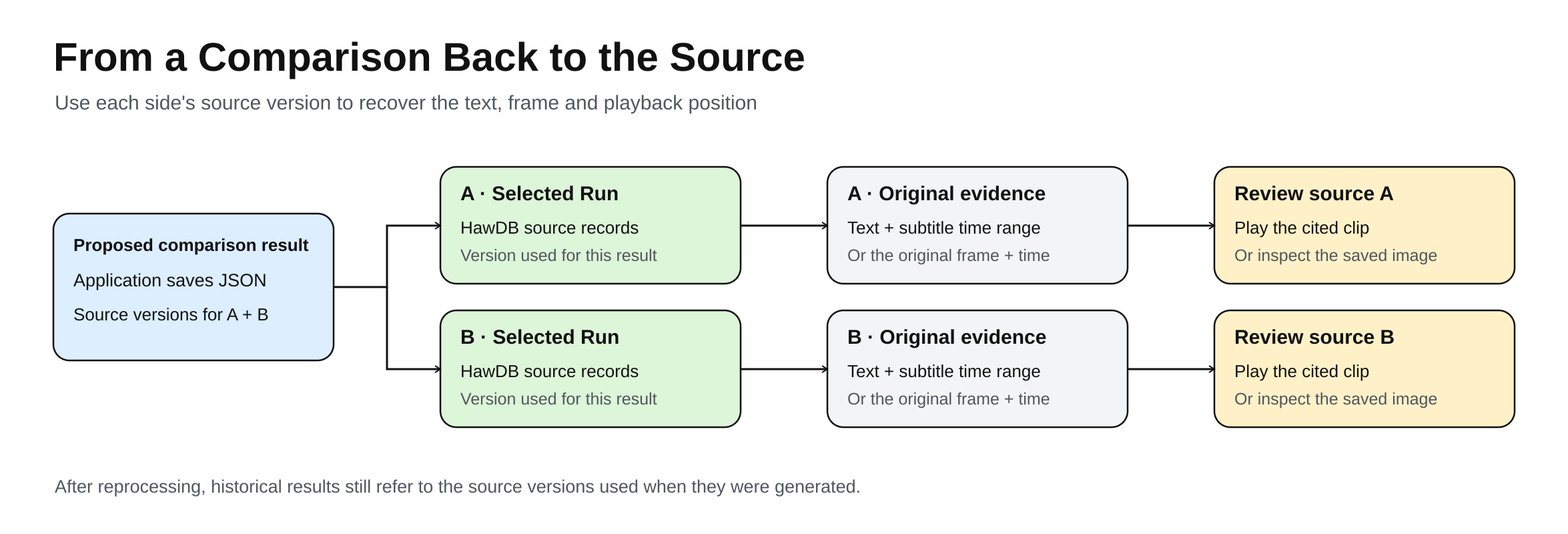
Subtitle playback extends the retrieved interval by up to three seconds on each side for context. Frame references can jump to the frame time and show the original image. Historical results retain their source versions, processing settings, and material.
A's reference to about three minutes of 4K60 recording shows how the data stays connected across these steps. This table does not imply that the original run used the optional vector search.
| Stage | Data passed onward | Purpose |
|---|---|---|
| Material storage | Original subtitle, start and end times, evidence identifier, run_id | HawDB preserves evidence and source versions for application reads |
| Candidate passages | Passage identifier, ordered subtitle cues, associated frames | The application prepares model inputs |
| Vane model call | evidence_id, first_cue, last_cue, and extracted fields | The model identifies references by passage and subtitle range; here evidence_id refers to a candidate passage |
| Resolve references | Original subtitles, times, and source versions | The application validates identifiers and ranges, then looks up the cited material |
| Comparison and playback | Labels, both statements, and video positions | The page displays results and source-review links |
Although the model left duration out of the condition field, the cited text retained it. Vane supplies inspectable fields and reference ranges, HawDB stores the material and source relationships needed for review, and the application connects them.
Readers interested in performance and heat may care about different tests. The demo below collects clips from four creators: Geekerwan for temperature-testing methods, for example, or Zhong Wenze for sustained recording. Timestamps open the clips, which viewers can also add to a watchlist.
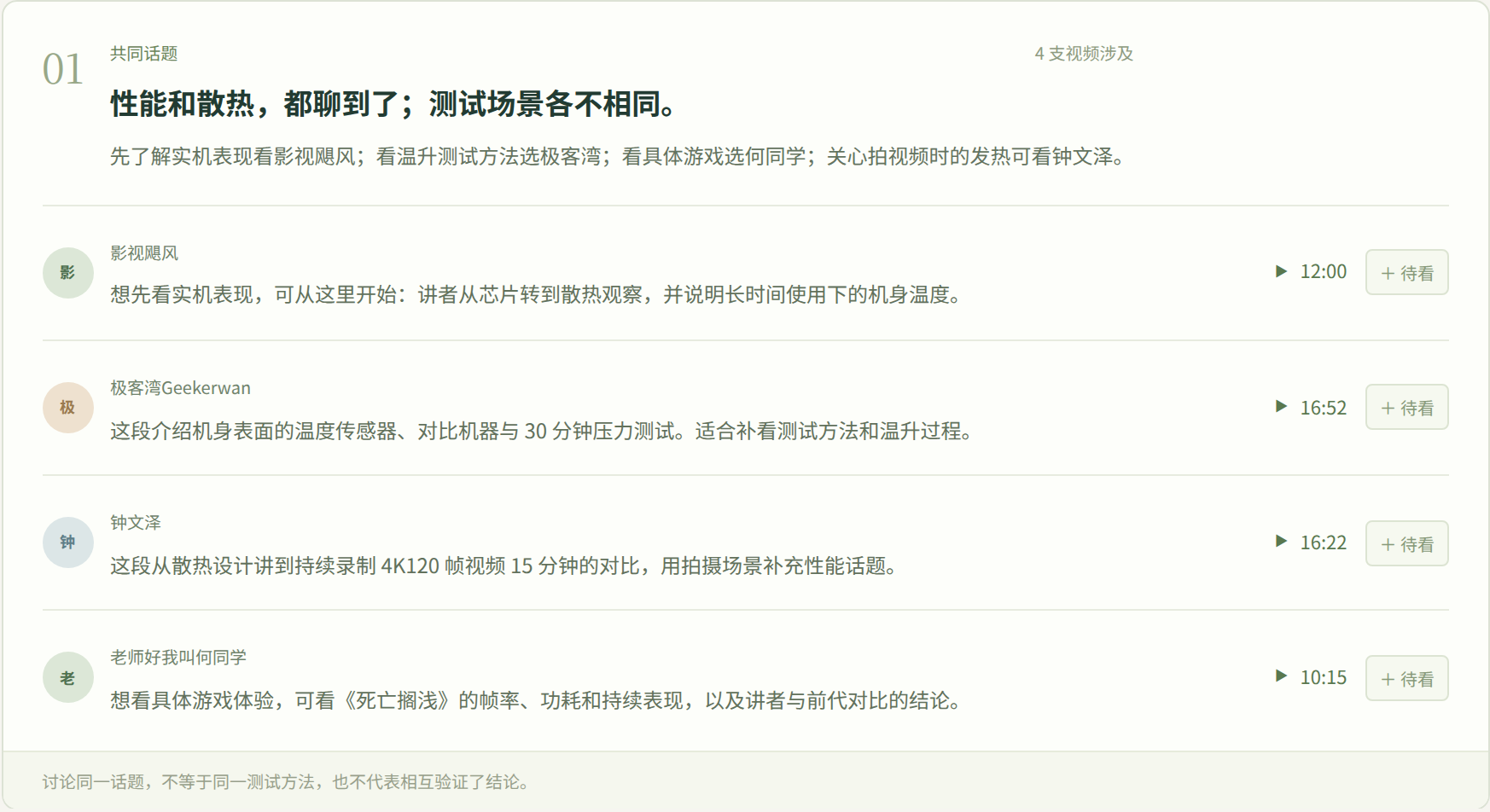
These clips were selected separately for the performance and heat topic and do not exactly match the earlier A and B citations. Each test's conditions still need to be checked.
Geekerwan's clip at 16:52 introduces the temperature sensors and the devices being compared. The subtitle at 17:08 gives the 30-minute test duration. Buttons above the player switch between creators' clips.
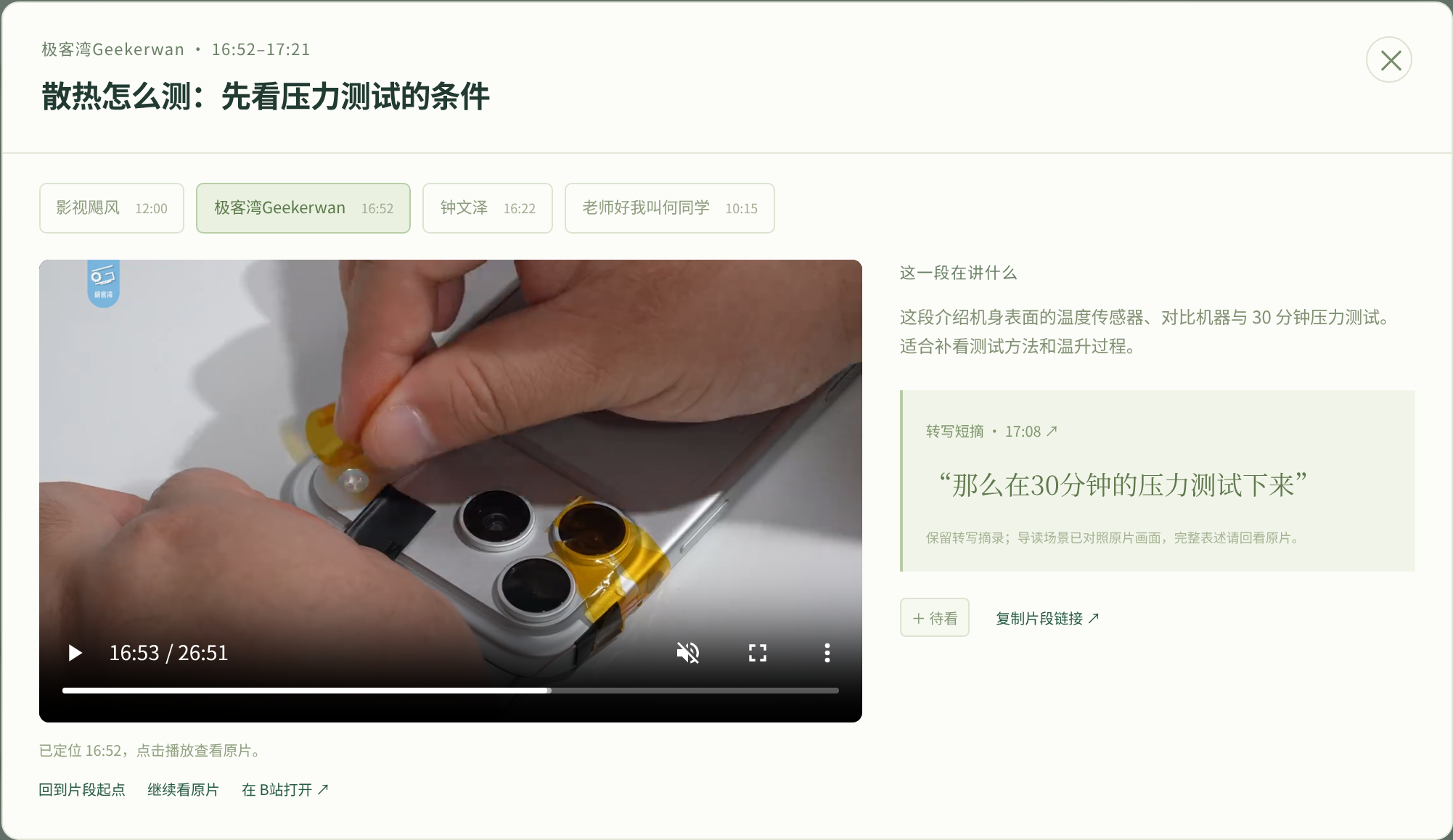
The video on the left is at 16:53; the text on the right corresponds to 17:08. Together they provide test context. The controls also allow viewers to continue the original video or open it on Bilibili.
Combining source text and manual checks produces the following viewing suggestions for A and B:
| Viewer question | Material to start with | What to check |
|---|---|---|
| How does the Duo feel to hold while recording? | A: Mediastorm, 12:46–13:16 | An experience report after about three minutes of 4K60 recording |
| What is the Pro Max's front-surface equilibrium temperature? | B: Geekerwan, 17:23–17:37; start at 17:08 for duration | Distinguish the two generations on the chart; a 30-minute high-load stress test |
| Do the descriptions conflict? | Compare devices, source text, and conditions on both sides | Different devices and scenarios do not establish a same-device contradiction |
| Can these passages establish cooling benefits and trade-offs? | Find more comparisons for the relevant device and conditions | The selected passages do not provide complete evidence |
These suggestions concern selected passages, not the videos' complete contents.
Each result records an outcome, such as relevant evidence found, no statement extracted, partial extraction failure, or processing failure. Removing an unsupported field leaves the original material intact. A missing statement in the output does not mean the creator never discussed the topic.
Reuse data when videos are added
Stored subtitles, frames, and source records can be used again. When a fifth video is added, valid caches preserve the extraction results for the original four videos and their six pairwise comparisons. Only the new video and its four comparisons with the existing videos need processing.
Reuse requires the original question, model configuration, processing protocol, runner, and source versions to remain unchanged, and the earlier results to be complete.
A new question can reuse the material while rerunning retrieval, extraction, and comparison. Changes to models, rules, or source material update the corresponding results while preserving the source versions used by historical comparisons.
The same division of work could be used for questions about course materials, product research, or knowledge drawn from multiple sources. Vane processes the material and calls models; HawDB stores relationships and provenance. The application keeps each analysis linked to the source versions and citations a reader would need to check it.