Vane Data + Jev: Building an End-to-End Voice Analytics Pipeline
When a customer calls about a banking problem, staff have to listen to the recording, summarize the request, and route it to the right queue. Besides hearing the words, they need to judge whether the matter is urgent, whether the customer is clearly unhappy, and whether anything still needs follow-up. Listening to every call is slow, and vague wording forces repeated confirmation.
Transcription removes some of the listening, but it does not solve routing. Customers rarely use standard business terms: "stop all transactions on my card" is a freeze request, yet the sentence never contains the word "freeze". Keyword matching misses any phrasing its rules do not cover. For a full call, routing also has to separate requests that were resolved from ones that are still open.
This article walks through the banking voice example from the demo-scene repository. The implementations of decode_audio and transcriber() are omitted; the full code and offline tests are linked at the end.
Background: keyword routing is not enough
Routing calls by keyword alone breaks in two common ways. The first is vocabulary: a customer may describe the outcome they want instead of naming the operation. The second is state: a request can appear in the transcript and still be resolved by the agent, and treating every mention as an open task sends work to the wrong queue. A useful pipeline therefore has to read the whole conversation, understand the request, and judge what is still pending.
Building the pipeline on Vane Data + Jev
Vane Data is the data processing framework that organizes this pipeline: every step is written as an operator, chained into one query plan, and scheduled by default on Ray. Relation is the abstraction that carries data between operators — think of it as a table that has not been computed yet: the output of one stage becomes the input of the next without intermediate files. Jev is the operator responsible for semantic judgment: it sends transcript text to an external model and returns structured judgments for preset questions. The model does not run locally.
TypeSafe AI released Jev in September 2026. Its official positioning is System One, essentially the "intelligent if statement" inside an agent flow. It does not generate text; its input can be unstructured state such as email, logs, or transcripts, and its output is typed answers with confidence probabilities. The API has only three primitives: Choice picks one option, Score rates on a given scale, and Noul returns a probability between 0 and 1. The five questions in this article are defined with them.
Jev skips token-by-token generation and returns every output in one parallel pass. Official figures put end-to-end latency at 70–500 milliseconds, up to 193.6× faster than frontier models on some tasks, at roughly 1/445 of the cost (input at $0.042 per million tokens, output free). For high-frequency routing decisions, that overhead is acceptable.
Jev is trained with its own RLCD method, which aims to make output probabilities track actual accuracy so programs can compare probabilities against thresholds directly. It adapts to new classification tasks without fine-tuning: the 14 intents here come only from question definitions, and the examples do not train the model. Ticket routing, content moderation, and risk rating are typical scenarios.
Below, the Chinese subset of PolyAI MInDS-14 goes through the complete flow: the CPU decodes audio, Whisper on the GPU transcribes, Jev makes structured judgments, and SQL shapes those judgments into business fields. All stages are connected on one Vane Relation chain and scheduled by a single query plan.
Typical flow: Chinese Parquet recordings → CPU decode and resample → GPU Whisper transcription → quality checks → Jev structured judgment → SQL field shaping → results.parquet / review.csv
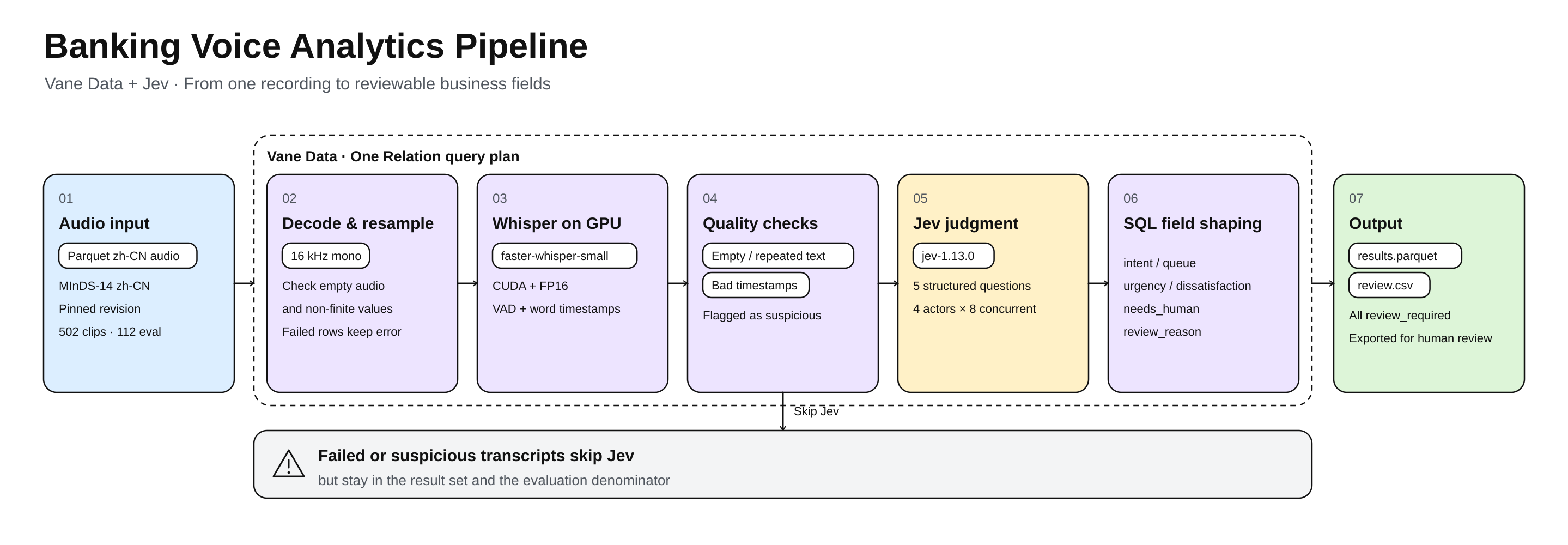
The work in the diagram falls into three kinds of compute resources. Vane executes on Ray by default: plain functions become Tasks, and callable classes and Jev become Actors. A Task is a one-off job; an Actor is a long-lived worker process that can reuse models and clients for its whole lifetime. Decoding and resampling are stateless, so they are submitted as CPU Tasks. Whisper needs a resident GPU allocation to reuse the model, so it runs as a GPU Actor. Jev judgments are made by an external API; the local executor only organizes requests, manages concurrency, and receives results. The model does not run locally.
Relations connect the stages: each stage consumes the previous stage's output directly, and nothing is written to disk in between. The pipeline's output is a set of business fields — the customer's intent (intent), the suggested queue (queue), urgency (urgency), dissatisfaction (dissatisfaction), whether human follow-up is still needed (needs_human), and the review flags (review_required, review_reason). Every result is marked for human review and exported to review.csv; the example does not route it to a review system or trigger business operations such as freezing or transfers.
Step 1: Turn audio into inspectable text
Selecting data with SQL
The example reads audio from Parquet (each row contains the recording path path, a language ID lang_id, and audio bytes audio.bytes), derives a record_id from the SHA-256 of the path, sorts by ID, and takes a fixed number of rows. raw is the Relation read by con.read_parquet(dataset), dataset is a fixed-revision file from the MInDS-14 Chinese subset, and limit comes from a command-line argument:
source = (
    raw.select(
        vane.sql_expr("sha256(path)").alias("record_id"),
        vane.sql_expr("CASE WHEN lang_id = 13 THEN audio.bytes ELSE error('Expected zh-CN') END").alias("audio_bytes"),
    )
    .order("record_id")
    .limit(limit)
)
This ID runs through the rest of the pipeline: decoding, transcription, business judgment, and evaluation all use it to refer to the same record. Only the record ID and audio bytes enter inference; the true intent labels stay out and are read only after results are saved, for evaluation.
Decoding and resampling on the CPU
Compressed audio inside the recording files cannot be used as a waveform directly. The CPU stage first checks that the audio has exactly one mono track, then decodes it to a 16 kHz waveform, checking for empty audio and non-finite values. This work is wrapped in decode_audio; the main line is a single map_batches call with an output schema declaration:
audio = source.map_batches(
    decode_audio,  # Implementation omitted
    schema={
        "record_id": vane.sqltypes.VARCHAR,
        "waveform": vane.list_type(vane.sqltypes.FLOAT),
        "error": vane.sqltypes.VARCHAR,
    },
    batch_size=BATCH_SIZE,
)
One design detail is worth noting: when decoding fails, the row does not disappear. It continues with an error field, so the final result contains not only successfully processed recordings but also the rows that need inspection.
Reusing the Whisper model in a GPU actor
The waveform then goes to Whisper. The example uses faster-whisper-small (model_path points to a model directory downloaded at a pinned revision); the actor loads the model at initialization and configures CUDA and FP16. Transcription specifies Chinese, enables the VAD filter, and requests word-level timestamps. Model loading is separate from per-item processing, so one actor can reuse the loaded model. These details live inside the callable class returned by transcriber(); the main line only declares the output schema and resources:
transcripts = audio.map_batches(
    transcriber(model_path),  # Implementation omitted
    schema={
        "record_id": vane.sqltypes.VARCHAR,
        "text": vane.sqltypes.VARCHAR,
        "segments": vane.sqltype(
            "STRUCT(role VARCHAR, start_ms BIGINT, "
            "end_ms BIGINT, text VARCHAR)[]"
        ),
        "baseline_intent": vane.sqltypes.VARCHAR,
        "error": vane.sqltypes.VARCHAR,
    },
    batch_size=BATCH_SIZE,
    actor_number=1,
    gpus=1.0,
)
This code makes the input handling, the output schema, and the GPU resource requirement explicit. BATCH_SIZE defaults to 128 and can be overridden with an environment variable; it is the number of records Vane hands to the UDF in one batch. Whisper does not run GPU batch inference on 128 recordings at once — it still calls model.transcribe() one by one inside the batch. The data processing batch and the model's internal inference batch are two different things.
Not every transcript is a valid input
The example checks for empty transcripts, abnormal repeated text, timestamps beyond the recording range, and timestamp ordering. These checks catch obvious anomalies; they cannot prove a transcript is fully correct, but they keep questionable text from producing business suggestions. Failed or suspicious records do not enter business judgment; state() later returns NULL for them.
Step 2: Structured business judgment from explicit questions
Transcript text cannot be turned into business fields directly: free-form summaries have no fixed fields, and their values are unstable. The example breaks the judgment into five questions — what business the customer wants, how urgent the matter is, whether the customer expressed dissatisfaction, whether human follow-up is still needed, and whether the transcript is clear enough — and draws boundaries for each value. Intent boundaries live in INTENTS, and the five questions are defined with Choice, Score, and Noul.
Fixing intent boundaries first
Each entry in INTENTS contains a business definition, a processing queue, and the word list used by the keyword baseline. The business text in this and the following questions() excerpt is translated for English readers. The runnable example uses Chinese definitions, keywords, and question instructions to match its Chinese transcripts:
INTENTS = {
    # intent: (definition, queue, keyword baseline)
    "card_issues": ("A bank card cannot pay, withdraw, or otherwise be used, excluding voluntary freezes.", "cards", ("can't pay", "card failed", "card not working")),
    "freeze": ("Freeze or block a lost, stolen, or at-risk card or account, stopping its transactions.", "card_security", ("freeze", "report lost")),
    "pay_bill": ("Actively pay a bill or ask how to make a payment, excluding automatic debit authorizations.", "payments", ("bill", "payment")),
    # The remaining 11 categories are omitted
}
"A bank card cannot pay" and "a customer asks to freeze a card" are two different intents; "actively pay a bill" and "authorize a merchant to debit automatically" are also separate. Without clear boundaries, both the model and the keyword baseline waver on similar phrasings.
Defining the five questions
The questions are defined with Choice, Score, and Noul: intent is single-choice, urgency and dissatisfaction are 0–4 scales, and the remaining two are yes/no judgments. Here are the intent definition and the two scale questions:
def questions():
    from typesafe_sdk import Choice, Noul, Score


    return {
        "intent": Choice(
            instructions="Based on the conversation, judge the caller's main banking request, including the original request if it was resolved. Use the agent context, but do not treat unrelated agent remarks as customer requests. Choose other when information is insufficient.",
            criteria={**{name: spec[0] for name, spec in INTENTS.items()}, "other": "Other business or insufficient information."},
        ),
        "urgency": Score(
            instructions="At analysis_time, how urgent are the customer's unresolved matters? Completed operations do not count, and do not speculate about losses or deadlines.",
            criteria=[
                "The matter is resolved, or this is a general inquiry with no open urgent item.",
                "A routine request is open and can be handled in the normal cycle, with no near deadline.",
                "The customer explicitly needs it soon, or normal business is affected, but there is no immediate risk of loss.",
                "There is a clear same-day deadline or a severe business blocker that needs priority handling.",
                "There is still an immediate risk of fraud, account takeover, or continuing financial loss that needs urgent intervention.",
            ],
        ),
        "dissatisfaction": Score(
            instructions="Judge dissatisfaction only from the caller's wording. Do not infer tone, and do not treat problem severity as dissatisfaction.",
            criteria=[
                "Neutral or polite inquiry with no dissatisfaction expressed.",
                "Mild confusion, inconvenience, or concern, without complaining about service.",
                "Clear disappointment, complaint, or dissatisfaction with how the matter was handled.",
                "Repeated or strong complaints, with obvious anger at the service.",
                "Extreme anger or insults, or threats to complain, expose, or close the account over a service issue.",
            ],
        ),
        # The needs_human and input_sufficient yes/no questions are described in the text.
    }
Urgency only assesses unresolved matters, and dissatisfaction looks only at wording, not tone. Score starts at 0, and the SQL adds 1 so outputs use the more common 1–5 range. Of the other two questions, one judges whether human follow-up is still needed (unanswered, unprocessed, or unfinished items count; resolved ones do not), and one judges whether the transcript is clear enough (no if it is fragmentary, contradictory, or unintelligible). These questions are designed for full calls, while MInDS-14 contains only a single customer utterance; the actual coverage is discussed in the evaluation section.
Building the request and calling Jev
The next decision is which data goes to Jev. state() builds only the language, the analysis time, and the transcript segments; analysis_time is after the call ends and serves as the reference point for judging unresolved matters. Failed rows return NULL here and skip judgment:
def state():
    # NULL makes the row skip Jev; only rows without errors build a request.
    return vane.sql_expr("""CASE WHEN error IS NULL THEN struct_pack(
        language := 'zh-CN', analysis_time := 'after_message_or_call_end', conversation := segments
    ) END""")
The raw audio and the true labels are never sent to the external service. Limiting fields is not the same as anonymization, though: transcript text may still contain personal information.
Connecting to Jev takes one Relation call:
judged = transcripts.jev(
    state(),
    questions=questions(),
    model=JEV_MODEL,          # Model version "jev-1.13.0"
    actor_number=4,
    max_concurrency_per_actor=8,
)
actor_number declares how many actors handle Jev requests, and max_concurrency_per_actor caps in-flight requests per actor; they describe request-side concurrency, not measured throughput.
How a Jev call executes
Building the expression only registers question definitions, the model, and credentials; it sends no request. It produces a processing step in the plan, attached to the same Relation as decoding and transcription. Request organization, concurrency control, and result alignment are handled by the execution layer; the whole call runs in three phases — build the plan, execute calls, write results back.
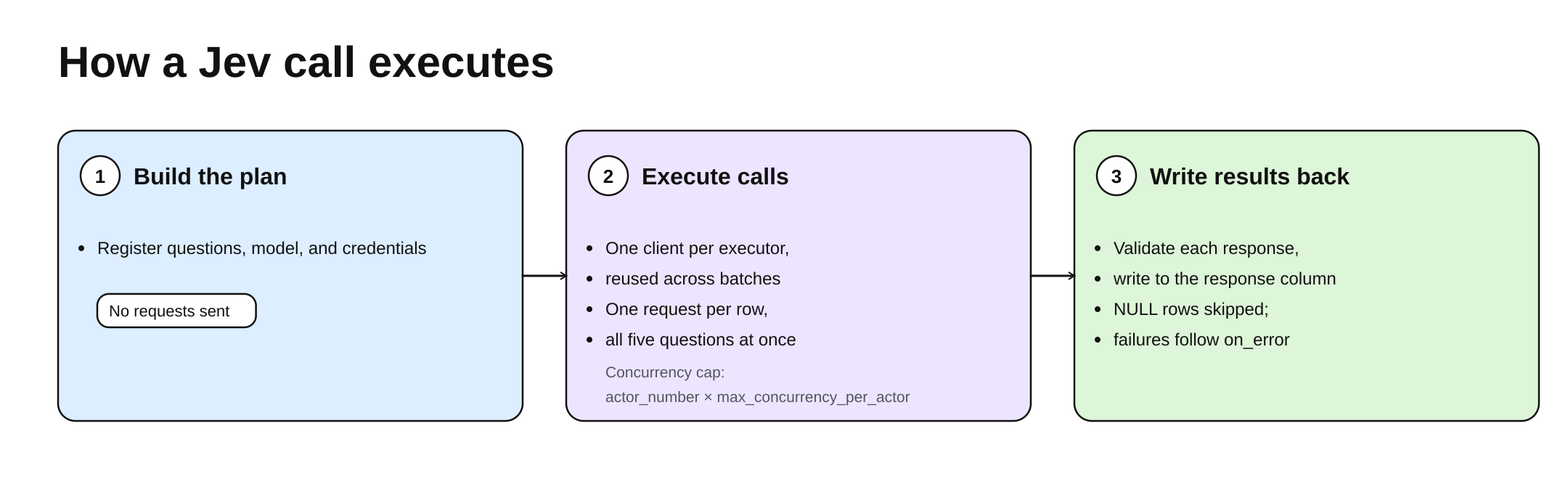
At execution time, each executor holds a reusable client that is shared across batches. Within one batch, every non-NULL row sends one request carrying all five questions at once.
The JSON returned by the service is validated against the request before it is written to the response column; NULL rows send no request, and failed rows either raise or become NULL according to on_error. The same execution and validation logic is available in SQL as ai_jev.
Vane's Jev support currently ships only in the vane-ai dev build on TestPyPI. You can install that version to call Relation.jev() in your own project:
pip install --index-url https://test.pypi.org/simple/ --extra-index-url https://pypi.org/simple/ "vane-ai[typesafe]==0.3.0.dev8"Step 3: Joining model output with business data in SQL
Jev writes its results to the response column. Business users need a table with stable, clearly named fields, so the pipeline runs SQL on the same chain to extract the JSON into business fields and derive review reasons from transcript quality and input sufficiency. Most fields are plain JSON extractions; only the parts that need judgment are shown here (the first argument to query() is the input Relation name, referenced as FROM judged in SQL):
result = judged.query(
    "judged",
    f"""
    SELECT record_id, text, segments, error, baseline_intent,
        CASE WHEN response IS NULL OR (response ->> '$.model') = '{JEV_MODEL}'
             THEN response ->> '$.answers.intent.choice'
             ELSE error('Unexpected Jev model version') END AS intent,
        (response ->> '$.answers.urgency.score')::DOUBLE + 1 AS urgency,
        (response ->> '$.answers.needs_human.noul')::DOUBLE AS needs_human_probability,
        needs_human_probability >= 0.5 AS needs_human,
        CASE WHEN error IS NOT NULL THEN 'transcript_requires_review'
             WHEN (response ->> '$.answers.input_sufficient.noul')::DOUBLE < 0.5 THEN 'insufficient_input'
             ELSE 'manual_confirmation' END AS review_reason
    FROM judged
    """,
)
Fields such as intent_confidence, dissatisfaction, and input_sufficient_probability are extracted or incremented the same way; the full SQL is in the source. These lines do four things: validate the returned model version, map 0–4 scores to 1–5, turn probabilities into needs_human with a 0.5 threshold, and derive review_reason from transcript errors and input sufficiency. DuckDB lets one SELECT reference aliases defined earlier in the same list, so needs_human_probability can be reused on the next line.
The final output fields are:
| Field | Business meaning |
|---|---|
| intent, queue | Customer request and the suggested processing queue |
| urgency, dissatisfaction | Urgency of unresolved matters, and dissatisfaction in the wording |
| needs_human | Whether staff still need to handle, verify, or reply to anything |
| review_required, review_reason | Whether the result needs review, and why |
needs_human and review_required are easy to confuse: the first says whether the customer has anything pending, the second says whether a human should look at the model's conclusion. A recording may be judged as "no follow-up needed" while that judgment itself still needs review, so the example sets review_required to true for every record.
Queue mapping uses the same INTENTS to generate a CASE: intents in the 14 categories map to a processing queue, and the rest keep their original value. Finally it writes results.parquet; both review.csv and the evaluation read that result and do not rerun Whisper or Jev.
What putting Jev into the query plan saves
Making Jev an operator on a Relation saves mostly the engineering work around model calls:
- Clients and concurrency: no request loops, connection pools, semaphores, or retries to write. Actor count and concurrency caps are declared in configuration; SDK clients are created per executor at runtime and reused across batches, and concurrency is bounded locally in each executor.
- Request organization and row alignment: every non-empty row sends exactly one request with all five questions; the returned JSON is joined back to the original row as a new column that later SQL can reference directly, with no manual reconciliation.
- Failure isolation and unified scheduling: state() lets failed or suspicious transcripts skip the external call while staying in the result set; transcript segments flow straight into Jev and then into SQL, while CPU Tasks, GPU Actors, and Jev Actors share one plan, with batching, retries, and data movement handled by the execution layer. Only the final results are written to results.parquet and review.csv.
These gains come with boundaries: Jev is an external service, so transcript text leaves the local environment, and results are for human review only — they never trigger business operations directly.
Evaluation: scope and boundaries
This example uses the Chinese subset of PolyAI MInDS-14. The source data provides 502 recordings and only a train split; the example does not train a model. It sorts by recording path hash and by default selects 112 of them for a fixed-subset evaluation. Each recording is one short customer utterance, not a complete multi-turn support call.
The evaluation compares two methods: matching keywords on Whisper transcripts, and asking Jev to judge intent from the same transcripts. Both therefore share the same audio input and the same speech recognition output. The keyword method returns an intent only when there is a unique highest-scoring match; otherwise it returns other.
| Metric | Question it answers |
|---|---|
| Intent accuracy | How many recordings were assigned the correct business intent |
| Macro-average F1 over 14 intents | F1 per class, then averaged |
| Queue accuracy | When the fine-grained intent differs, does the request still reach the right queue |
Intent accuracy and queue accuracy are computed separately because different intents can map to the same processing queue: routing can still be correct when classification is not precise.
Another important detail: failed records still count in the evaluation denominator. The code checks that the final record count and ID set match the initially selected set; looking only at the successfully returned part can give a flattering accuracy to a pipeline that fails often.
The example ships no measured scores, so it cannot claim how much Jev improves over the keyword method, nor make throughput or cost claims. The fixed subset was used during development, and there is no way to confirm whether these recordings overlap with upstream model training data, so it is not a strictly independent test set. Urgency, dissatisfaction, and follow-up judgments have no ground-truth labels, and the 0.5 threshold used for needs_human is not calibrated.
The pipeline outputs fields and never triggers business operations directly: every result carries review_required and is exported to review.csv for human review. The example processes short single-utterance recordings, labels every transcript segment as caller, does not implement speaker separation, and does not validate analysis of complete multi-turn calls.
What is genuinely reusable is the organization: Whisper turns sound into text, Jev produces structured judgments around explicit questions, SQL shapes those judgments into business fields, and Vane puts these stages and resource declarations into one plan. The model call is only one step — data preparation comes before it, quality checks sit in the middle, and field shaping, result storage, evaluation, and a CSV for human review come after. A recording thus becomes traceable, reviewable data instead of a single model request.
Running the example
The example runs on Python 3.12, uv, and one CUDA GPU. Vane and the TypeSafe SDK are installed separately (see the installation guide for other environment options):
uv venv --python 3.12 .venv
source .venv/bin/activate
uv pip install --index-strategy unsafe-best-match \
  --index-url https://test.pypi.org/simple/ \
  --extra-index-url https://pypi.org/simple/ \
  'vane-ai[typesafe]==0.3.0.dev8' 'typesafe-sdk==0.7.0'
uv pip install -r requirements.txt
Set TYPESAFE_API_KEY and run from the example directory:
export TYPESAFE_API_KEY="your-api-key"
.venv/bin/python src/banking_voice_pipeline.py \
  --output-dir output/banking_voice_pipeline \
  --limit 112
The output directory must be new. The run downloads the fixed-revision MInDS-14 Chinese subset and faster-whisper-small, and prints keyword-baseline and Jev intent metrics at the end. On CUDA machines, add cuBLAS 12 and cuDNN 9 to LD_LIBRARY_PATH. The full code and offline tests are in the banking-voice-pipeline.
Letting data processing carry more business understanding
Vane Data + Jev shows one direction: letting data processing carry more business understanding so more data can become usable judgments and grounds for action. When data contains human expression, intent, and context, business value often has to pass through understanding and judgment to be extracted. Combining Vane Data with Jev makes such judgments part of the data processing flow: data is organized and computed, and can also form results for analysis and use based on business definitions.
This opens a broader application space for data systems. As business questions change, the same processing pattern can carry new judgment dimensions and bring information scattered across unstructured content into daily analysis and decisions. Data engineering and business understanding become more directly connected.
The banking voice case is only a starting point. What is more worth exploring is how to organize, combine, and validate semantic judgment like any other data operation, so that data systems can answer more business questions that fixed rules could not describe.