Multimodal context.Ready for your agents.
Connect enterprise content and business data. Retrieve, analyze and retain the knowledge each task needs, with less repeated processing and lower context costs.
Outdoor campsite
A drink comes together at the campsite: pour the ingredients, then start blending.
Interactive example · curated understanding
See Vane Context in action.
Follow a marketing task from enterprise data to cited context, then see how it supports other agents.
From enterprise data to agent-ready context.
Connect your sources, keep knowledge current and deliver cited context through tools and Skills.
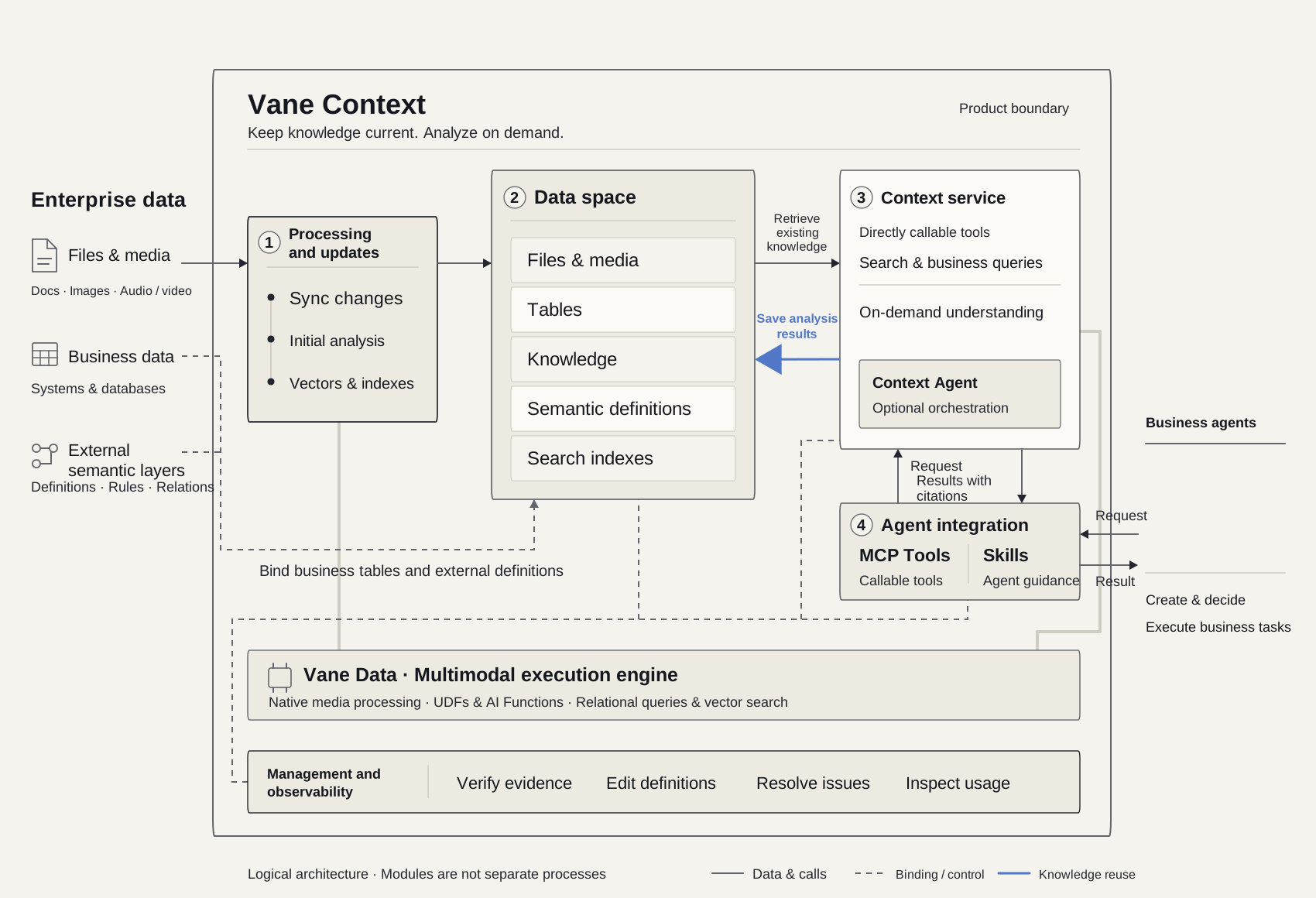
Enterprise data
Files & media · Business tables · External semantic definitions
Vane Context
Processing and updates
Sync changes → extract and analyze → embed and index
Data space
Files & media · Tables · Knowledge · Semantic definitions · Search indexes
Business tables and external definitions can stay in their source systems and be bound here.Context service
Search & business queries · On-demand understanding and media processing
Agent integration
MCP Tools · Skills
MCP tools expose capabilities; Skills guide the agent.Vane Data
Supports preparation and online processing: native media, UDFs, AI Functions, relational queries and vector search.
Management and observability
Verify sources · Manage semantic definitions · Troubleshoot · Monitor usage and costs
Business agents
Use the context to create, decide and act.
Update searchable knowledge as your data changes.
Analyze relevant content when a task needs more detail.
Save the results as knowledge for future tasks.
Connect multimodal content, business data and semantics.
Link files, media and tables to business models, relationships and metric definitions so agents can use them in context.

comp_001
Original video, transcripts, action clips and source references.
creative_id: comp_001View the source clip →ad_daily
- creative_id
- comp_001
- Business fields
- date / impressions / clicks / conversions
Campaign performance
ad_daily.creative_id = creatives.idConversion rate = conversions / clicks. Compare the same reporting period and scope.
Link the source clip to business records through its asset ID.
Example data connections. Campaign metrics are supplied by the relevant business records.
Automate data preparation. Analyze on demand.
Keep knowledge up to date as data changes. Retrieve what is already known, analyze the missing details and save reusable results.
Extract content with source locations, and maintain embeddings, indexes and source versions.
Find footage that shows portable use, with evidence.
- Retrieve the relevant part
Locate candidate clips using existing indexes.
- Analyze the missing details
Analyze only the relevant clip.
- Return task-relevant context
Return the finding and its original reference.

Blending at the campsite
The footage shows ingredients being blended on the outdoor table.
comp_001 / 00:05–00:07Validated analysis results are saved to the data space for future retrieval and reuse.
One connection. Tools and Skills, on demand.
Connect your existing agent through MCP. Discover authorized capabilities and task-specific guidance from the service as you work.
- 01
Connect your MCP client
Choose the data spaces and capabilities to share. Copy the connection settings into your agent’s MCP client.
- 02
Verify tools and guidance
Ask the agent to check the connection and discover the available tools and Skills. Only authorized, published guidance is returned.
- 03
Start with a business task
Give the agent your task, known facts and constraints. It reads relevant Skills when needed and retrieves or prepares context through the tools.
View an example MCP configuration
{
  "mcpServers": {
    "vanecontext": {
      "url": "<MCP_ENDPOINT_URL>",
      "headers": {
        "Authorization": "Bearer <CONNECTION_TOKEN>"
      }
    }
  }
}
Use the endpoint and token from your service. The exact configuration format depends on your MCP client.
The right Skill, when your agent needs it.
The service exposes guidance and scenario Skills through the same connection. Your agent discovers their purpose and version, then reads only the instructions relevant to the task.
list_context_skillsPurpose · scope · versionread_context_skillSKILL.md + referencesUse tools directly
Let your agent search, query, inspect evidence and request authorized processing within its own workflow.
Delegate context research
Let a Context Agent investigate missing enterprise information and return findings, sources and gaps. Your agent continues the business task.
Built-in and external agents use the same guidance. Clients with MCP Skills support can discover Skills natively; other clients use the guidance tools. Available actions always follow the service’s permissions.
Visibility into sources, processing and cost.
Verify results, manage semantic definitions, track tasks and monitor model usage and costs in one workspace.
Verify results against the source
Open the original image, document page or media time window behind a result. Compare the source with the interpretation, and distinguish observed facts from inferred conclusions.
Manage processing and semantic definitions
Choose processing channels and models. Review business models, relationships and metric definitions before publication, and manage the knowledge your agents can use.
Track tasks and troubleshoot issues
Follow processing and context tasks. Locate the affected file, failed step and reported cause, then retry the work that needs attention.
Monitor usage and costs
Review token usage, estimated costs, reuse and compression by model, task and processing stage. Missing usage or pricing is clearly labeled.
Agent solutions built around your business tasks.
Combine data connections, task-specific processing, a semantic layer and agent skills across six business use cases.
Outdoor creative references
- Relevant clip: a drink made at the campsite.
- Visible action: pour, add ice, blend.
- Support product claims with approved specifications and brand information.
Connect product facts, brand guidelines, creative assets and campaign data to give marketing agents verifiable references and evidence for planning.
Explore this use case