Documents32.2% less time than Ray Data
Workload and configuration
Document extraction and processing.
Batch sizes:Vane 2560, Ray 320, Daft 20.
Workload definitions and scripts →Combine file processing, model inference and relational queries in one pipeline. Develop locally and scale execution with Ray.
pip install vane-aiimport vane con = vane.connect() images = con.sql(""" SELECT image_file( 'quickstart-images/large.png' ) AS source """) images.select(""" source, image_file_metadata(source).width AS width, resize(decode_image_file(source, 'RGB'), 224, 224) AS thumbnail """).show()
Process media and business fields in one data model.
VARCHAR · FILEIMAGEFILE · IMAGEAUDIOFILE · TENSORVIDEOFILE · IMAGEPython UDFCustom logic and stateful processing
AI Functionsai_prompt · ai_embed
Dynamic batching · Concurrency · Backpressure
State reuse · Retry & recovery
Use analysis results in filters, joins and aggregations.
Model output as a native STRUCT.
Typed vectors, ready for search.
Filter, join, aggregate and write.
Use the results in the next query or write them to your data store.
Query multimodal files and business fields in the same data model.
Compose SQL, Python UDFs and AI Functions for processing and inference.
Coordinate batching, concurrency and compute resources.
Follow an equipment inspection pipeline from native media types and Python UDFs to AI extraction, embeddings and business queries.
SELECT file AS source_file
FROM list_files($file_glob)
WHERE file_path(file) LIKE '%.pdf'
  AND file_size(file) < 20*1024*1024;
import vane
con = vane.connect()
root = "s3://manufacturing/factory-a"
Both interfaces share input relations, instructions, model configuration and output schemas. Bind SQL parameters through con.sql(..., params=...). The complete example includes setup and indexes.
Filter object metadata first. Read the candidate files when a later operation needs their content.
Overlap reading, preprocessing and inference across batches, with backpressure to control in-flight data.
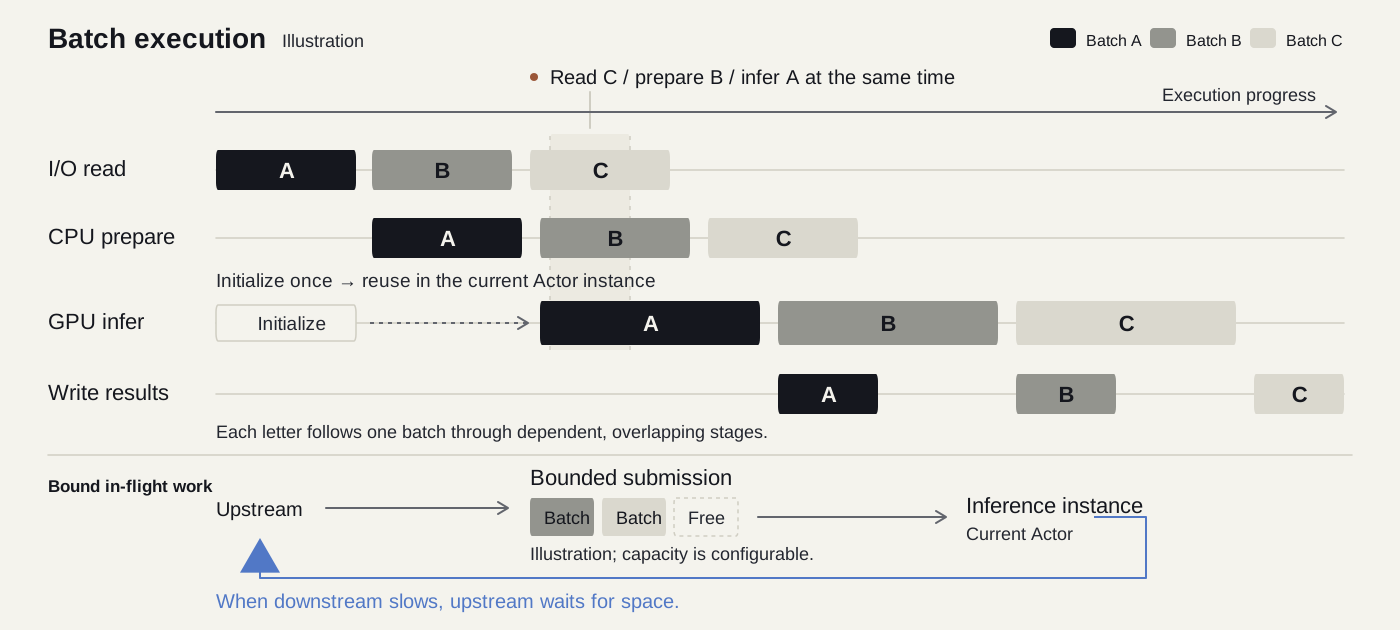
Read C, preprocess B and run inference on A concurrently.
Initialize and reuse the model within the Actor instance.
↶ Upstream waits for capacity when downstream slows.
Read the next batch, prepare the current one and infer the previous one at the same time.
Batch and submission limits keep faster upstream work from overwhelming slower stages.
A stateful UDF keeps its model or client across batches within the same execution instance.
Execution diagram. Stages overlap; error handling and retries follow the relevant execution settings.
Reuse your processing logic across local and Ray execution.
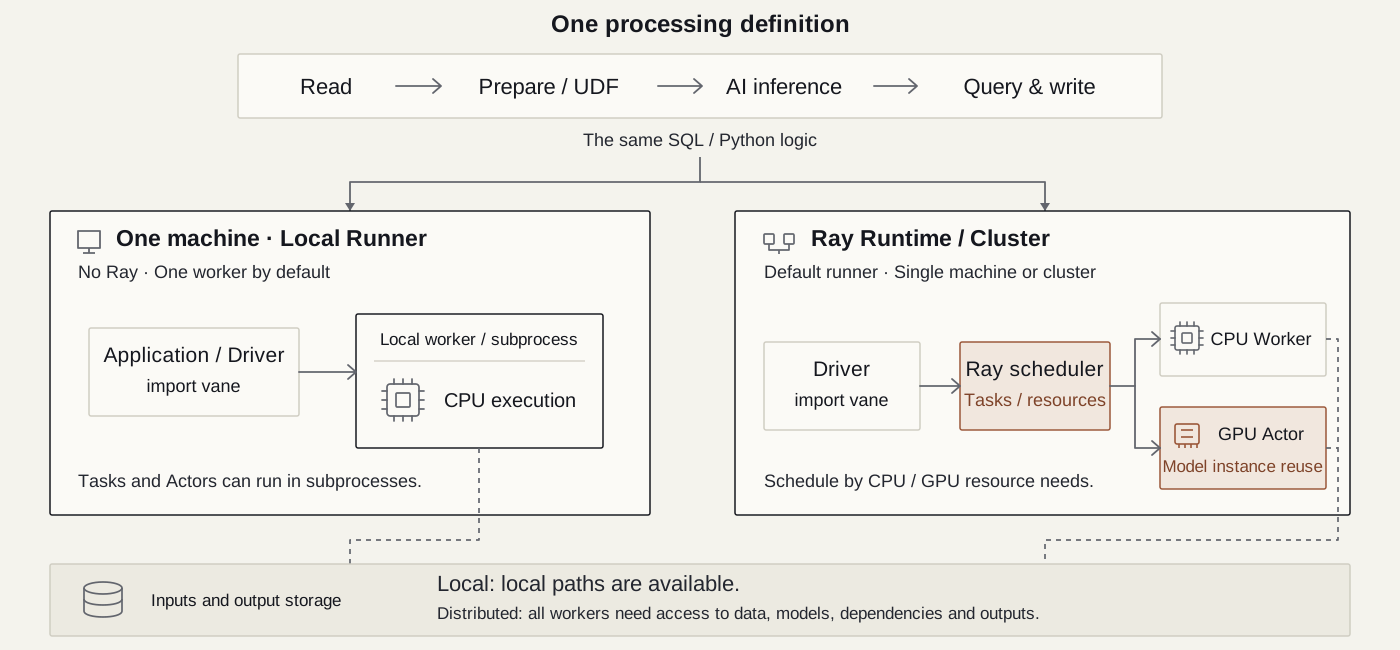
Same definition: read → prepare / UDF → AI → query & write
import vaneLocal files or accessible object storage.
Use the local runner for development, validation and on-demand processing, without starting Ray.
import vane


vane.configure(runner="local")
con = vane.connect()
result = con.sql(pipeline_sql)
result.show()
Same definition: read → prepare / UDF → AI → query & write
import vaneAll workers need access to inputs, models, dependencies and output storage.
Run Ray on one machine or a cluster, scheduling CPU workers and GPU actors according to declared resource needs.
import vane


# Ray is the default runner.
con = vane.connect()
result = con.sql(pipeline_sql)
result.show()
Both examples use the same pipeline_sql. Configure credentials, dependencies and data access for your environment. Ray runs locally or on a cluster and handles GPU resource scheduling.
Deployment guide →Explore execution times alongside the workloads, hardware and settings behind them.
Document extraction and processing.
Batch sizes:Vane 2560, Ray 320, Daft 20.
Workload definitions and scripts →Image processing pipeline.
Batch sizes:Vane 100, Ray 100, Daft OOM.
Workload definitions and scripts →Audio processing pipeline.
Batch sizes:Vane 128, Ray 128, Daft OOM.
Workload definitions and scripts →Video processing pipeline.
Batch sizes:Vane 32, Ray 32, Daft not set.
Workload definitions and scripts →36 CPU / 64 GB RAM / 2080 Ti, 22 GB modified VRAM. Single-node, batch-size-tuned results.
This single-node evaluation follows the workload design of the Ray Data multimodal AI benchmark. Results apply to the documented hardware, data and settings. Daft ran out of memory on the image and audio workloads. See the benchmark page for methodology and scripts.
View methodology, scripts and results →Prepare images, video and audio for training: filter, transform, label and export reproducible datasets with SQL and Python.
Turn enterprise files and media into structured, searchable records. Keep business identifiers and source references for your retrieval and agent applications.
Install and run an image processing example, with no model credentials required.
Save as prepare_images.py and run python3 prepare_images.py once in your working directory.
from pathlib import Path
from PIL import Image


folder = Path("quickstart-images")
folder.mkdir(exist_ok=True)
for name, size in [("large", (640, 480)),
                   ("medium", (320, 240)), ("small", (64, 64))]:
    Image.new("RGB", size, "#546354").save(folder / f"{name}.png")
WITH images AS (
  SELECT image_file(file) AS source
  FROM list_files('quickstart-images/*.png')
), metadata AS (
  SELECT source, image_file_metadata(source) AS info FROM images
), thumbnails AS (
  SELECT info.width AS source_width, info.height AS source_height,
         resize(decode_image_file(source, 'RGB'), 224, 224) AS thumbnail
  FROM metadata WHERE info.width >= 300
)
SELECT source_width, source_height,
       image_width(thumbnail) AS width,
       image_height(thumbnail) AS height
FROM thumbnails ORDER BY source_width DESC;
Save the query above, then run:
python3 -c 'import sys, vane; vane.configure(runner="local"); vane.connect().sql(sys.stdin.read()).show()' < quickstart.sql| source_width | source_height | width | height |
|---|---|---|---|
| 640 | 480 | 224 | 224 |
| 320 | 240 | 224 | 224 |
The 64 × 64 image is filtered out before pixel decoding. Selected images become native IMAGE values, resized to 224 × 224.
python3 -m pip install 'vane-ai[image]'Install in a virtual environment, create the sample images, then run the same example using SQL or Python.