From a Few PDFs to Thousands: Can Your Embedding Pipeline Keep Up?
When you first build a knowledge base, you may only need to import a few product manuals to see whether AI can answer business questions. Once the results prove useful, more content follows: historical reports, operating guides, internal policies, and more. A handful of PDFs gradually becomes thousands.
A process that once finished quickly starts taking longer. How soon will newly added content become searchable? If the model already supports batching, why is processing still slow? As your knowledge base grows, it is worth taking a closer look at the entire pipeline from PDFs to embeddings.
A Few PDFs: Get Started with a Few Lines of Code
Ingesting PDFs into a knowledge base typically involves extracting text, splitting it into chunks, generating embeddings for retrieval, and writing them to a vector database. Tools such as LangChain and LlamaIndex make it easy to build this pipeline. The following LangChain example connects PDF loading, text splitting, embedding generation on a local GPU, and writes to Milvus:
# Imports, model initialization, and Milvus collection creation are omitted.
# splitter: RecursiveCharacterTextSplitter; model: HuggingFaceEmbeddings.
client = MilvusClient(uri="http://localhost:19530")


for pdf in pdf_files:
    # 1. Load PDF pages
    for page in PyMuPDFLoader(pdf).lazy_load():
        # 2. Split text into chunks
        chunks = splitter.split_documents([page])


        # 3. Generate embeddings in batches
        for start in range(0, len(chunks), 512):
            batch = chunks[start:start + 512]
            vectors = model.embed_documents([c.page_content for c in batch])


            # 4. Assemble chunks and embeddings into rows, then write to Milvus
            # Row construction is omitted; each row contains id, source, page, text, and vector.
            client.upsert(collection_name="pdf_chunks", data=rows)
This code shows only the key calls. Imports, initialization, record construction, and error handling are omitted. The model's internal inference batch size is configured to 32. The Milvus collection must be created in advance.
For a small number of documents, this is a straightforward starting point that is easy to inspect. You can readily trace how each page is split, whether embeddings are generated, and whether the results are written successfully. The example already uses batching: it submits multiple text chunks to the model at once and writes records to Milvus in batches.
Batching determines how much work is processed at once; you also need to consider whether the stages can make progress concurrently. In the code above, processing for the current page finishes before the next page is loaded. As the number of documents grows, the time spent waiting between stages deserves closer attention.
Thousands of PDFs: Batching Alone Is Not Enough
Thousands of PDFs do not represent thousands of equally sized tasks. Some documents contain just two pages, while others run close to a hundred. Parsing times vary, as do the numbers of chunks produced. Text extraction and splitting primarily use the CPU, while the embedding model runs on the GPU. If the CPU can prepare the next batch of text while the GPU processes the current one, the pipeline has an opportunity to reduce idle time.
Simply increasing concurrency or batch sizes does not necessarily improve performance. If text is not supplied quickly enough, the GPU waits for data. If too much text is prepared in advance, intermediate chunks consume memory. If writes cannot keep up, results accumulate. Efficiently processing large document collections requires balancing throughput across parsing, splitting, inference, and writing.
The pipeline can be organized as follows, with the CPU continuously preparing text, the GPU generating embeddings in batches, and results written out promptly:
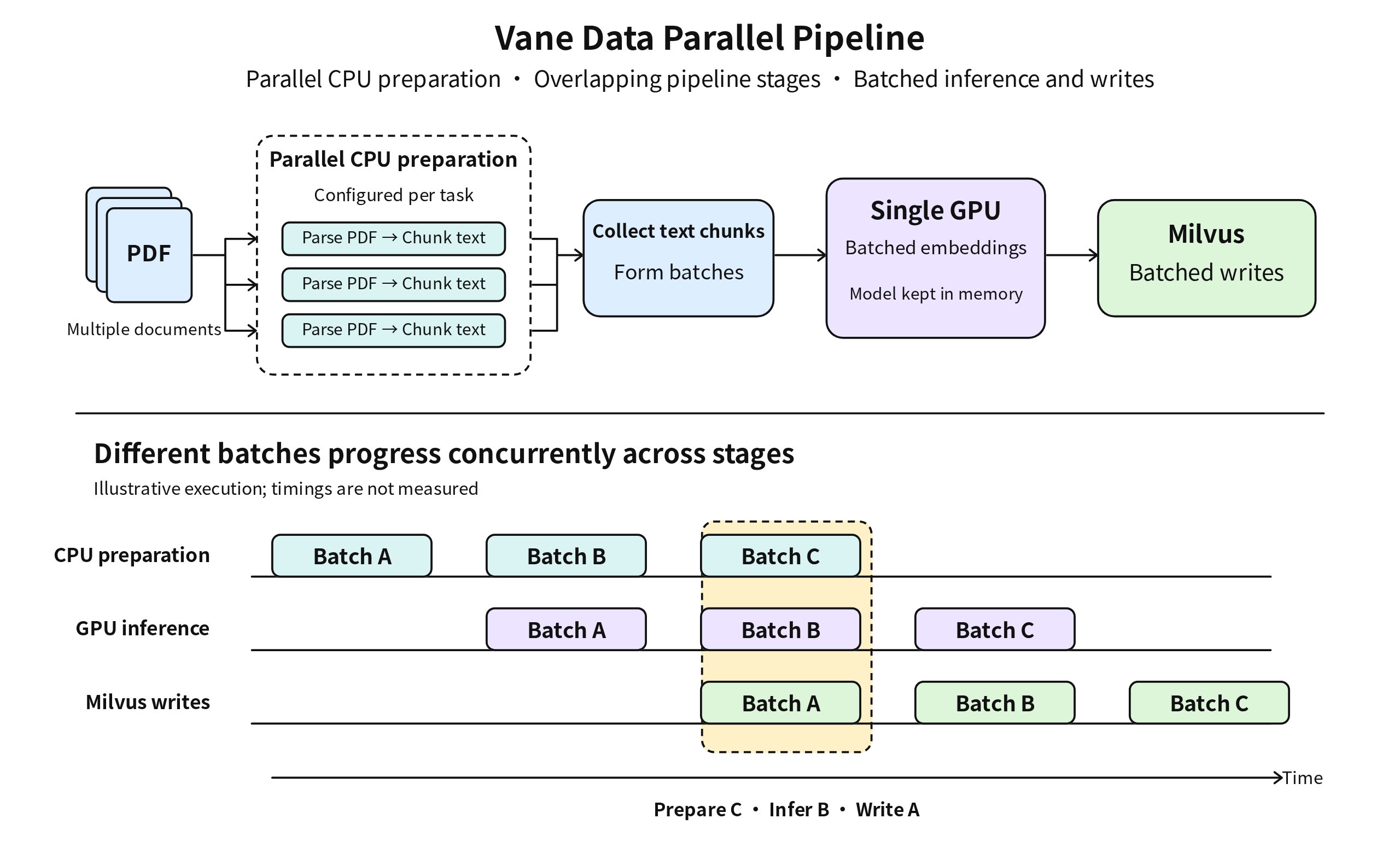
LangChain and LlamaIndex also provide concurrency and batching capabilities, so teams can continue optimizing their existing implementations. When you find yourself frequently adjusting process counts, batch sizes, and intermediate data buffering, it is worth considering a dedicated data processing engine to coordinate the pipeline.
Run the Entire Embedding Pipeline Efficiently with Vane Data
Vane Data lets you keep using familiar PDF parsing tools, text splitters, and embedding models while integrating them into a unified execution pipeline. Once you encapsulate the parsing and inference logic in processing functions, the following public APIs let you build a pipeline from PDFs to Milvus:
import vane


# Definitions of files (an Arrow table) and the output schemas are omitted.
# User-defined pdf_chunks: parse a PDF, split the text, and yield chunks one at a time.
# User-defined Embedder: initialize the model and convert a batch of chunks into an Arrow table with embeddings.
con = vane.connect()


# 1. Read the file list and expand each PDF into text chunks
chunks = con.from_arrow(files).flat_map(pdf_chunks, schema=chunk_schema)


# 2. Generate embeddings in batches using a GPU worker process
vectors = chunks.map_batches(
    Embedder, schema=vector_schema,
    batch_size=2560, actor_number=1, gpus=1.0,
)


# 3. Write in batches using Vane's MilvusSink
vectors.write_datasink(vane.MilvusSink(
    "pdf_chunks", uri="http://localhost:19530", primary_key="id",
    max_batch_rows=512,
))
pdf_chunks and Embedder are a user-defined processing function and class, respectively; their implementations are omitted here. Both examples write to a Milvus collection containing the primary key id, source, page, text, and a 384-dimensional vector field, with AutoID and dynamic fields disabled. The Vane engine batch size, model inference batch size, and Milvus write batch size can be configured independently.
In this code, flat_map() expands each PDF into multiple text chunks; map_batches() passes chunks in batches to a model that remains loaded in the worker process; and write_datasink() uses MilvusSink to write embeddings and their source text in batches. The application logic at each stage remains explicit, while Vane Data coordinates execution.
As you scale from a few documents to larger processing workloads, your team can configure inference resources and write batch sizes within the same pipeline. You retain control over parsing tools, splitting rules, and model selection, and can continue using LangChain's text splitters. Vane Data connects these processing stages so that teams can optimize execution efficiency across the complete workload.
For knowledge base teams, what ultimately matters is how long it takes to prepare a batch of content. To evaluate the actual efficiency of document processing, we compared three engines: Vane Data, Ray Data, and Daft.
The Same Task, from Nearly 7 Minutes to 86 Seconds
We ran the same PDF processing task with all three engines on the same machine: extract text, split it into chunks, generate embeddings, and save the results. All three used the same text extraction tool, splitting rules, and embedding model. Batch sizes were tuned separately for each engine, and we compared the time taken to complete the full pipeline.
The following performance figures come from benchmark [1]. Timing covers the complete processing pipeline, from reading the input to saving the embedding results as Parquet. It excludes the Milvus writes shown in the examples above and index creation. The results are as follows:
| Implementation | Completion Time |
|---|---|
| Vane Data | 86.09 seconds |
| Ray Data | 127 seconds |
| Daft | 413 seconds |
Vane Data completed this test fastest, reducing execution time by 32.2% compared with Ray Data and by 79.2% compared with Daft.
The reduction “from nearly 7 minutes to 86 seconds” refers specifically to the comparison between Daft and Vane Data in this test. It illustrates how the same document preparation task takes different amounts of time with different engines. The two Milvus examples above demonstrate how to ingest the results and are not included in this performance comparison.
With a few PDFs, the priority is to get the knowledge base working. With thousands, the priority is to prepare each batch of content faster. If your team is bulk-importing historical documents or needs to reduce processing time for newly added content, you can start with your existing parsing tools and models, use Vane to coordinate the processing pipeline, connect it to Milvus, and evaluate the speedup on your own data.
Test notes: These results apply to this single-machine test and the specific implementations used. The hardware consisted of a 36-core CPU, 64 GB of RAM, and an NVIDIA 2080 Ti with 22 GB of GPU memory. Input files were stored locally.