Assisted Product Category Review with Vane Data and Lance
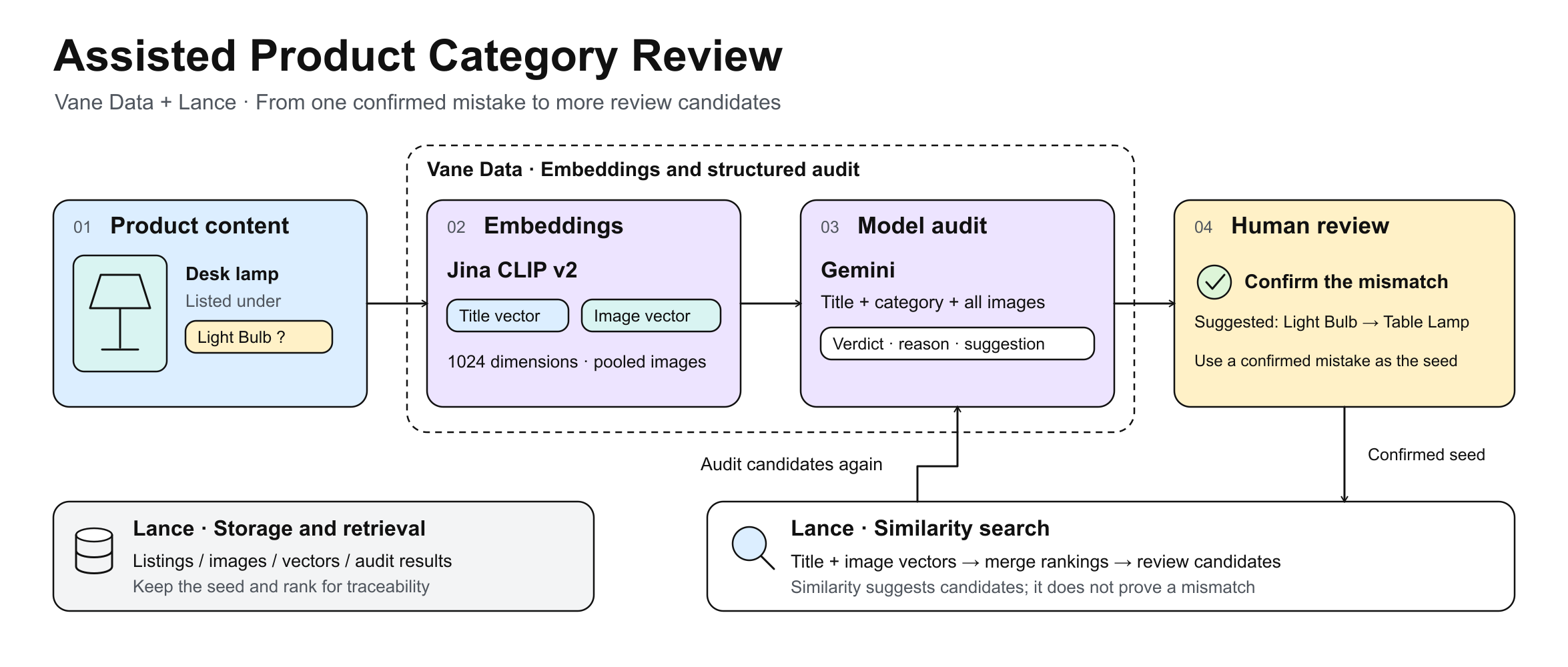
Merchants sometimes choose the wrong category for a product, and checking every title and image by hand takes time. This article uses a small batch of listings to demonstrate assisted review: a model checks whether the title, images, and category agree and flags listings for a person to review. Once a reviewer confirms a mistake, similarity search finds other listings in the batch worth checking.
The responsibilities are:
- Lance stores listings, images, vectors, and audit results, and retrieves similar listings.
- Vane Data prepares the content, generates embeddings, calls the model, and turns its answers into structured data.
- Reviewers check flagged listings and decide whether a category needs correcting.
The model and similarity search select listings for review. A person makes the final decision.
The code follows the Lance extension for Vane conventions: vane.connect() uses the Ray runner by default, so the pipeline never sets VANE_RUNNER or calls a runner-selection API. Listings and audit results are written to Lance with ATTACH ... (TYPE LANCE) plus relation.create() and relation.insert_into(), previews use .show(), Python reads rows with .fetchall(), and similarity search uses lance_vector_search. The model and the similarity search only point reviewers at rows worth checking. They do not decide whether a category is wrong.
Start from one confirmed mistake
Listing B073P3NK7T is titled "Table Desk Lamp With Bulb." In this scenario, it is a complete lamp that belongs in Table Lamp, but the merchant has placed it in Light Bulb. The example code generates placeholder images by default; checking whether the actual title and images agree requires real product images.
A reviewer confirms that this one listing is misplaced. That confirmation becomes the seed for the rest of the pipeline: search the same batch with the seed's title and image vectors for listings close to it, audit those candidates, and let a person decide again.
The batch used below has eight listings. One of them, B011AA1004, has no image and no category. It stays in the source table, but it never enters the vector or audit stages.
Set up the environment
Embeddings and vision review need two free API keys: Jina for jina-clip-v2, and Google AI Studio for the audit model. Eight listings use very little of either free tier.
Install Vane Data and the Lance extension with the following command:
export JINA_API_KEY="..."
export GOOGLE_API_KEY="..."


python -m pip install vane-ai vane-extension-lance "grpcio>=1.42.0"
Then connect, load the Lance extension, and attach the namespace that receives the writes:
import vane


connection = vane.connect()
vane.load_installed_extension("lance", connection=connection)


# The target Lance namespace for writes; the directory is created automatically.
connection.execute("ATTACH 'lance_store' AS lance_ns (TYPE LANCE, READ_ONLY false)")
1. Prepare the listings and images
Three source tables feed the pipeline: products with the listing ID, title, and category ID; product_images with image bytes, source, and main-image flag; and categories with category names.
The metadata join does not aggregate, so listings with missing images or categories survive it. Images are then assembled per listing in Python, with the main image first: the batch is small, and sorting in Python makes the order deterministic instead of depending on whether distributed execution preserves it. The assembled rows become a constant relation that travels with the plan, the same pattern the official querying_images.py example uses.
The last check is completeness. Rows with a title, a category, and at least one image continue. Incomplete rows stay in the source tables; they simply do not get vectors and do not enter the audit.
# Seed batch: eight listings, including B073P3NK7T. B011AA1004 has neither an
# image nor a category, to exercise the is_complete check below. To use ABO data
# instead, replace these VALUES with ABO listings (CC BY 4.0, see the final note)
# and point abo_images/ at the ABO image directory; the SQL below does not change.
connection.sql("""
    SELECT * FROM (VALUES
      ('B073P3NK7T', 'Table Desk Lamp With Bulb',      'cat_bulb'),
      ('B073Q8LM2A', 'Modern Fabric Table Lamp Shade', 'cat_lamp'),
      ('B073R1N9QW', 'Vintage Brass Desk Lamp',        'cat_lamp'),
      ('B011AA1001', 'LED Light Bulb 60W Equivalent',  'cat_bulb'),
      ('B011AA1002', 'Edison Vintage Bulb 4-Pack',     'cat_bulb'),
      ('B011AA1003', 'Table Lamp With USB Port',       'cat_bulb'),
      ('B011AA1004', 'Ceramic Table Lamp Base',        NULL),
      ('B011AA1005', 'Glass Pendant Light Shade',      'cat_lamp')
    ) AS t(item_id, title, merchant_category_id)
""").create("lance_ns.main.products")


connection.sql("""
    SELECT * FROM (VALUES
      ('cat_lamp', 'Table Lamp'),
      ('cat_bulb', 'Light Bulb')
    ) AS t(category_id, category_name)
""").create("lance_ns.main.categories")
# One or two images per listing, named <item_id>_0.jpg with image 0 as the main
# image. Generate placeholders only for files that are missing, so real ABO
# images (CC BY 4.0) can replace them under the same names.
from pathlib import Path
from PIL import Image


Path("abo_images").mkdir(exist_ok=True)
for item in ["B073P3NK7T", "B073Q8LM2A", "B073R1N9QW", "B011AA1001",
             "B011AA1002", "B011AA1003", "B011AA1005"]:
    for k in range(2 if item in ("B073P3NK7T", "B011AA1003") else 1):
        p = Path(f"abo_images/{item}_{k}.jpg")
        if not p.exists():
            Image.new("RGB", (64, 64), (200 - k * 40, 180, 160)).save(p, format="JPEG")


# B011AA1004 intentionally has no image: it demonstrates a listing that stays in
# the source table but never reaches the audit.
connection.sql("""
    SELECT 'B073P3NK7T' AS item_id, content AS image_bytes, 'abo' AS source, TRUE  AS is_main, 0 AS position FROM read_blob('abo_images/B073P3NK7T_0.jpg')
    UNION ALL SELECT 'B073P3NK7T', content, 'abo', FALSE, 1 FROM read_blob('abo_images/B073P3NK7T_1.jpg')
    UNION ALL SELECT 'B073Q8LM2A', content, 'abo', TRUE,  0 FROM read_blob('abo_images/B073Q8LM2A_0.jpg')
    UNION ALL SELECT 'B073R1N9QW', content, 'abo', TRUE,  0 FROM read_blob('abo_images/B073R1N9QW_0.jpg')
    UNION ALL SELECT 'B011AA1001', content, 'abo', TRUE,  0 FROM read_blob('abo_images/B011AA1001_0.jpg')
    UNION ALL SELECT 'B011AA1002', content, 'abo', TRUE,  0 FROM read_blob('abo_images/B011AA1002_0.jpg')
    UNION ALL SELECT 'B011AA1003', content, 'abo', TRUE,  0 FROM read_blob('abo_images/B011AA1003_0.jpg')
    UNION ALL SELECT 'B011AA1003', content, 'abo', FALSE, 1 FROM read_blob('abo_images/B011AA1003_1.jpg')
    UNION ALL SELECT 'B011AA1005', content, 'abo', TRUE,  0 FROM read_blob('abo_images/B011AA1005_0.jpg')
""").create("lance_ns.main.product_images")
# Join the metadata without aggregation so listings with missing images or
# categories survive. Then fetch this small batch into Python, assemble the
# images per listing with the main image first, and send the rows back as a
# constant relation. The source tables stay untouched: incomplete rows are
# preserved, not silently dropped.
from collections import defaultdict


meta_rows = connection.sql("""
    SELECT p.item_id, p.title, p.merchant_category_id,
           c.category_name AS merchant_category
    FROM lance_ns.main.products p
    LEFT JOIN lance_ns.main.categories c
      ON c.category_id = p.merchant_category_id
    ORDER BY p.item_id
""").fetchall()


img_rows = connection.sql("""
    SELECT item_id, image_bytes, source, is_main, position
    FROM lance_ns.main.product_images
    ORDER BY item_id, position
""").fetchall()


imgs = defaultdict(list)
for item_id, blob, source, is_main, pos in img_rows:
    imgs[item_id].append((bool(is_main), int(pos), bytes(blob)))
for parts in imgs.values():
    parts.sort(key=lambda t: (not t[0], t[1]))  # main image first, then position


def quote_ident(v):
    return '"' + v.replace('"', '""') + '"'


assembled = []
for item_id, title, cat_id, cat_name in meta_rows:
    images = [b for _, _, b in imgs.get(item_id, [])]
    is_complete = (title is not None
                   and cat_id is not None
                   and len(images) > 0)
    assembled.append({"item_id": item_id, "title": title,
                      "merchant_category_id": cat_id,
                      "merchant_category": cat_name,
                      "images": images, "is_complete": is_complete})


cols = ["item_id", "title", "merchant_category_id",
        "merchant_category", "images", "is_complete"]
raw = connection.values(
    *(tuple(vane.ConstantExpression(r[c]) for c in cols) for r in assembled))
proj = ", ".join(f"{quote_ident(s)} AS {quote_ident(c)}"
                 for s, c in zip(raw.columns, cols, strict=True))
complete = raw.query(
    "input_rows", f"select {proj} from input_rows").filter(
        vane.col("is_complete"))
complete.select("item_id").show()
# B011AA1004 (no image, no category) has is_complete = false and continues no further.
2. Generate embeddings
Both the title vector and the image vector come from Jina's jina-clip-v2 at 1024 dimensions. Titles go in as text, images go in as images, and one model for both puts them in the same vector space, which keeps text-to-image search open for later.
Vane's vane.ai.embed supports OpenAI, Google, and Transformers rather than Jina, so both embedding paths call Jina's /v1/embeddings endpoint from map_batches. JINA_API_KEY is read only from the environment.
A listing with more than one image is handled in three steps:
- embed each image separately and normalize it;
- average the vectors dimension by dimension;
- normalize the average again.
That combines the main image and the context images into one image vector per listing.
import base64, io, os
import numpy as np
import pyarrow as pa
import requests
from PIL import Image


JINA_URL = "https://api.jina.ai/v1/embeddings"


# Title vectors: one request per batch of titles; the response is already normalized.
def embed_titles_jina(batch: pa.Table) -> pa.Table:
    titles = batch.column("title").to_pylist()
    api_key = os.environ["JINA_API_KEY"]  # read from the environment only
    resp = requests.post(
        JINA_URL,
        headers={"Content-Type": "application/json",
                 "Authorization": f"Bearer {api_key}"},
        json={"model": "jina-clip-v2",
              "dimensions": 1024,
              "normalized": True,
              "embedding_type": "float",
              "input": [{"text": t} for t in titles]},
        timeout=120,
    )
    resp.raise_for_status()
    vecs = [d["embedding"] for d in resp.json()["data"]]
    return pa.table({
        "item_id": batch.column("item_id"),
        "title": batch.column("title"),
        "merchant_category_id": batch.column("merchant_category_id"),
        "merchant_category": batch.column("merchant_category"),
        "images": batch.column("images"),
        "title_vec": pa.array(vecs, type=pa.list_(pa.float32(), 1024)),
    })


with_title_vec = complete.map_batches(
    embed_titles_jina,
    schema={"item_id": "VARCHAR",
            "title": "VARCHAR",
            "merchant_category_id": "VARCHAR",
            "merchant_category": "VARCHAR",
            "images": "BLOB[]",
            "title_vec": "FLOAT[1024]"},
    batch_size=16,  # short title text, so the batch can be larger
)
with_title_vec.show()
# Image vectors use the image input of the same Jina endpoint. Each image is
# embedded separately and normalized, then the listing's vectors are averaged
# and normalized again: the three steps described above.
# The UDF passes the whole row through with image_vec attached, so the next step
# writes one table to Lance without another join.
def _to_data_url(raw: bytes) -> str:
    img = Image.open(io.BytesIO(bytes(raw))).convert("RGB")
    img.thumbnail((512, 512))  # jina-clip-v2 tiles at 512, so shrink to save tokens
    buf = io.BytesIO()
    img.save(buf, format="PNG")
    return "data:image/png;base64," + base64.b64encode(buf.getvalue()).decode()


def _l2(a: np.ndarray) -> np.ndarray:
    n = float(np.linalg.norm(a))
    return a / n if n > 0 else a


def embed_images_passthrough(batch: pa.Table) -> pa.Table:
    all_images = batch.column("images").to_pylist()  # BLOB[]
    api_key = os.environ["JINA_API_KEY"]  # read from the environment only
    out = []
    for images in all_images:
        raws = [bytes(b) for b in (images or []) if b]
        if not raws:
            out.append(None)
            continue
        resp = requests.post(
            JINA_URL,
            headers={"Content-Type": "application/json",
                     "Authorization": f"Bearer {api_key}"},
            json={"model": "jina-clip-v2",
                  "dimensions": 1024,
                  "normalized": False,  # normalize, average, and normalize manually
                  "embedding_type": "float",
                  "input": [{"image": _to_data_url(r)} for r in raws]},
            timeout=120,
        )
        resp.raise_for_status()
        vecs = [_l2(np.array(d["embedding"], dtype=np.float64))
                for d in resp.json()["data"]]
        out.append(_l2(np.mean(vecs, axis=0)).astype(np.float32).tolist())
    return pa.table({
        "item_id": batch.column("item_id"),
        "title": batch.column("title"),
        "merchant_category_id": batch.column("merchant_category_id"),
        "merchant_category": batch.column("merchant_category"),
        "images": batch.column("images"),
        "title_vec": batch.column("title_vec"),
        "image_vec": pa.array(out, type=pa.list_(pa.float32(), 1024)),
    })


with_both_vecs = with_title_vec.map_batches(
    embed_images_passthrough,
    schema={"item_id": "VARCHAR",
            "title": "VARCHAR",
            "merchant_category_id": "VARCHAR",
            "merchant_category": "VARCHAR",
            "images": "BLOB[]",
            "title_vec": "FLOAT[1024]",
            "image_vec": "FLOAT[1024]"},
    batch_size=4,  # image requests are heavier, so the batch is smaller
)
with_both_vecs.show()
# Write to Lance. A batch this small uses exact search with no vector index; for a
# larger dataset, build an IVF_PQ index with the pylance SDK (index-management
# SQL is outside the Ray contract).
with_both_vecs.create("lance_ns.main.products_search")


connection.sql("SELECT count(*) AS rows FROM lance_ns.main.products_search").show()
# rows = 7: one of the eight listings is incomplete and never reaches this table
3. Audit the batch with a model
Send each listing's title, category name, and all images to the model, requesting these fields:
- recognized_product: the product the model identifies;
- verdict: whether the category matches;
- suggested_category: a suggested category, which may be null;
- confidence: the model's self-reported confidence;
- reason: the reason for its judgment.
The verdict has three possible values:
- match: the title and images support the current category;
- mismatch: the content indicates another category;
- uncertain: the available information is insufficient or contradictory.
The model only assists. confidence is the model's self-reported value, not a measured probability. A person still makes the final call.
# Prompt column: title and merchant category as one string; the image column
# carries the whole BLOB[] so the model sees every image of the listing.
to_audit = connection.sql("""
    SELECT item_id, title, merchant_category_id, merchant_category,
           images, title_vec, image_vec,
           ('Product title: ' || title
            || '. Merchant category: ' || coalesce(merchant_category, 'unknown')
            || '. Decide whether the title and ALL images support this category.'
           ) AS audit_prompt
    FROM lance_ns.main.products_search
""")


# Structured output: a portable JSON Schema subset with a closed object and all
# properties required; a nullable suggested category uses ["string", "null"].
audit_schema = {
    "type": "object",
    "properties": {
        "recognized_product": {"type": "string"},
        "verdict": {"type": "string",
                    "enum": ["match", "mismatch", "uncertain"]},
        "suggested_category": {"type": ["string", "null"]},
        "confidence": {"type": "number"},
        "reason": {"type": "string"},
    },
    "required": ["recognized_product", "verdict", "suggested_category",
                 "confidence", "reason"],
    "additionalProperties": False,
}
import vane.ai


# The audit model is Gemini (Vane's built-in google provider; GOOGLE_API_KEY is
# read from the environment). Field notes: use a model name the key can list
# (gemini-3.5-flash-lite passed in this run); 3.x models reject classic sampling
# parameters such as temperature, so do not pass them; give max_output_tokens
# enough room (2048), because 3.x thinking tokens count against the output budget;
# and keep requests serial on the free tier's low RPM.
audited = vane.ai.prompt(
    to_audit,
    [vane.col("audit_prompt"), vane.col("images")],  # text plus all images
    provider="google",
    model="gemini-3.5-flash-lite",
    system_message=("You are a product-category audit assistant. "
                    "Judge only from the given title and images; "
                    "never invent unseen details."),
    return_format=audit_schema,  # returns a native STRUCT column named audit
    output_column="audit",
    max_output_tokens=2048,
    batch_size=1,
    actor_number=1,
    max_concurrency_per_actor=1,
)


audited.select(vane.col("item_id"), vane.col("title"),
               vane.col("merchant_category"), vane.col("audit")).show()
4. Store the results and review only suspicious rows
The audit results go into a new table, products_category_audit. The search table and the candidate table are not modified. The audit table keeps the listing content, the vectors, and the search provenance, and adds the model verdict, the suggested category, the reason, and the review status.
# Flatten the STRUCT into columns and add the audit status; the search-provenance
# fields (seed and rank) stay NULL until the expansion step fills them.
audited.select(
    vane.col("item_id"), vane.col("title"),
    vane.col("merchant_category_id"), vane.col("merchant_category"),
    vane.col("images"), vane.col("title_vec"), vane.col("image_vec"),
    vane.sql_expr("CAST(NULL AS VARCHAR)").alias("seed_item_id"),
    vane.sql_expr("CAST(NULL AS BIGINT)").alias("retrieval_rank"),
    vane.sql_expr("audit.recognized_product").alias("recognized_product"),
    vane.sql_expr("audit.verdict").alias("verdict"),
    vane.sql_expr("audit.suggested_category").alias("suggested_category"),
    vane.sql_expr("audit.confidence").alias("confidence"),
    vane.sql_expr("audit.reason").alias("reason"),
    vane.lit("completed").alias("audit_status"),
).create("lance_ns.main.products_category_audit")
A reviewer starts with the rows the model considers mismatched:
SELECT item_id, merchant_category, recognized_product,
       verdict, suggested_category, reason, images
FROM products_category_audit
WHERE audit_status = 'completed'
  AND verdict = 'mismatch'
ORDER BY retrieval_rank;
connection.sql("""
    SELECT item_id, merchant_category, recognized_product,
           verdict, suggested_category, reason, images
    FROM lance_ns.main.products_category_audit
    WHERE audit_status = 'completed'
      AND verdict = 'mismatch'
    ORDER BY retrieval_rank
""").show()
Reviewers can see the following in a single record:
- The category selected by the merchant
- The product identified by the model
- The category suggested by the model
- The model's reasoning
- The original images
After a reviewer confirms a correction, the listing goes to the catalog system for the change. Listings with an uncertain verdict also need review and should not be treated as approved.
5. Find more candidates with similarity search
Once a reviewer confirms that a listing is in the wrong category, it can serve as a seed for finding similar listings in the same batch.
Search separately with the seed's title vector and image vector, then merge the two rankings by listing ID. Listings that rank highly in both searches receive a better combined rank. A listing found in only one search can still make the final candidate list.
These candidates can go through another model audit or directly to a reviewer. Similarity alone does not establish a category error; each candidate still needs to be checked.
One confirmed mistake can therefore help identify other listings in the batch that may share the same error and deserve attention in the next review pass. The code below performs the searches, merges the rankings, and writes the candidates to the audit table.
# Read the seed vectors for the confirmed mismatch (Python needs rows, so use fetchall):
seed_rows = connection.sql("""
    SELECT title_vec, image_vec
    FROM lance_ns.main.products_search
    WHERE item_id = 'B073P3NK7T'
""").fetchall()
seed_title_vec, seed_image_vec = seed_rows[0]


def vec_literal(vec, dim):
    return "[" + ",".join(repr(float(x)) for x in vec) + f"]::FLOAT[{dim}]"


# Two exact searches (use_index = false; a batch this small needs no vector index).
# Each result is written to its own Lance table first, because intermediate
# relations inside one SQL statement are not visible to later statements on Ray.
connection.sql(f"""
    SELECT item_id, _distance AS title_distance
    FROM lance_vector_search(
        'lance_store/products_search.lance', 'title_vec',
        {vec_literal(seed_title_vec, 1024)},
        k = 5, use_index = false, prefilter = true
    )
""").create("lance_ns.main.title_hits")


connection.sql(f"""
    SELECT item_id, _distance AS image_distance
    FROM lance_vector_search(
        'lance_store/products_search.lance', 'image_vec',
        {vec_literal(seed_image_vec, 1024)},
        k = 5, use_index = false, prefilter = true
    )
""").create("lance_ns.main.image_hits")
# Merge the two ranked lists by listing ID: strong ranks in both searches push a
# listing up, and a hit in only one list is still kept. The fused score is the sum
# of the ranks, with a missing rank counted as k + 1; lower is better.
connection.sql("""
    WITH t AS (
        SELECT item_id, title_distance,
               row_number() OVER (ORDER BY title_distance ASC, item_id ASC) AS title_rank
        FROM lance_ns.main.title_hits
    ),
    m AS (
        SELECT item_id, image_distance,
               row_number() OVER (ORDER BY image_distance ASC, item_id ASC) AS image_rank
        FROM lance_ns.main.image_hits
    )
    SELECT coalesce(t.item_id, m.item_id) AS item_id,
           t.title_rank, m.image_rank,
           coalesce(t.title_rank, 6) + coalesce(m.image_rank, 6) AS fused_score,
           row_number() OVER (
               ORDER BY coalesce(t.title_rank, 6) + coalesce(m.image_rank, 6) ASC,
                        coalesce(t.title_rank, 6) ASC,
                        coalesce(m.image_rank, 6) ASC
           ) AS retrieval_rank
    FROM t FULL OUTER JOIN m USING (item_id)
    WHERE coalesce(t.item_id, m.item_id) <> 'B073P3NK7T'  -- drop the seed itself
    ORDER BY retrieval_rank
    LIMIT 10
""").create("lance_ns.main.candidates")


connection.sql("SELECT * FROM lance_ns.main.candidates ORDER BY retrieval_rank").show()
# Write the candidates back into the audit table with their search provenance,
# ready for another model pass or a direct human look:
connection.sql("""
    SELECT s.item_id, s.title, s.merchant_category_id, s.merchant_category,
           s.images, s.title_vec, s.image_vec,
           'B073P3NK7T' AS seed_item_id,
           c.retrieval_rank,
           CAST(NULL AS VARCHAR) AS recognized_product,
           CAST(NULL AS VARCHAR) AS verdict,
           CAST(NULL AS VARCHAR) AS suggested_category,
           CAST(NULL AS DOUBLE) AS confidence,
           CAST(NULL AS VARCHAR) AS reason,
           'pending' AS audit_status
    FROM lance_ns.main.products_search s
    JOIN lance_ns.main.candidates c USING (item_id)
""").insert_into("lance_ns.main.products_category_audit")
At this point, the code has appended the candidates to the audit table as pending records, retaining the seed listing ID and retrieval rank for traceability. Another model audit or human review is a separate step. For a model audit, follow the approach in step 3 with this candidate batch as the input.
What the run produces
The original demonstration recorded results for seven complete listings, using Jina embeddings and Gemini audit on the default Ray runner. The model outputs below are retained from the original draft. The merchant category for B011AA1005 has been corrected to Table Lamp to match the seed data; its model output has not been revalidated with that input.
| Listing | Merchant category | Recognized product | Verdict | Suggested category | Confidence |
|---|---|---|---|---|---|
| B073P3NK7T | Light Bulb | Table Desk Lamp | mismatch | Table Lamps | 0.95 |
| B011AA1003 | Light Bulb | Table Lamp With USB Port | mismatch | Table Lamps | 0.95 |
| B011AA1005 | Table Lamp | Glass Pendant Light Shade | mismatch | Pendant Light Shade | 0.95 |
| B073Q8LM2A | Table Lamp | Modern Fabric Table Lamp Shade | mismatch | Lamp Shades | 0.95 |
| B011AA1001 | Light Bulb | LED Light Bulb | match | — | 0.5 |
| B011AA1002 | Light Bulb | Edison Vintage Bulb | match | — | 1.0 |
| B073R1N9QW | Table Lamp | Vintage Brass Desk Lamp | match | — | 1.0 |
Expanding from B073P3NK7T ranks the other misplaced listing, B011AA1003, first:
| Rank | Listing | Title rank | Image rank |
|---|---|---|---|
| 1 | B011AA1003 | 2 | 2 |
| 2 | B011AA1001 | 5 | 3 |
| 3 | B073R1N9QW | 3 | — |
The demonstration used placeholder images, so the model judged mostly from titles. These results illustrate storing vectors, producing structured audit output, and merging two search rankings. They do not establish audit accuracy or retrieval quality for real product images. Evaluating those requires replacing the placeholders with real images and running the pipeline again.
Conclusion
This workflow keeps product content, model judgments, and retrieval provenance in Lance so reviewers can query flagged records and check the evidence. After confirming a mistake, they can use title and image search to find more listings to review. The example ends with pending candidates; category changes still require human confirmation and are applied by the catalog system.
Data note: Product data is sourced from Amazon Berkeley Objects (ABO), licensed under CC BY 4.0. The code uses manually listed example records and generates placeholders for missing images. The merchant's category errors and the batch review scenario are illustrative, not real events recorded in ABO.