Apache Doris + Vane: Bringing Multimodal Files into AI Search and Analytics
Orders, support tickets, and production batches are already stored in databases. Yet much of the detailed feedback customers provide about products remains in customer support recordings, written records, and attachments.
To find out which other customers have experienced similar issues and which production batches their reports relate to, teams typically need to listen to recordings, compile descriptions of the issues, and then check each case against business systems. The different types of data already exist, but querying and analyzing them together remains difficult.
Apache Doris and Vane connect these two types of data: Vane transforms multimodal content, including recordings, images, and video, into text, provisional classifications, and vector embeddings; Doris integrates these outputs into the existing business data environment. By linking them to orders, support tickets, production batches, and other records, the same content can support both similar-case retrieval and further business analysis, while retaining references to the original material for verification.
Apache Doris: Integrating Multimodal Data into the Enterprise Data Environment
AI search in an enterprise typically involves more than finding content with a similar meaning. Real business queries also include specific constraints, such as product model, date range, and equipment type, as well as orders, support tickets, and production batches that require further investigation.
Storing business data in Doris and performing text and vector search there allows business filters and AI search to be combined within the same SQL queries.
- Narrow the scope with business filters, then find similar content. For example, to find “reports of X1 units failing to start in the past month,” first filter by product model and date range, then use vector search to retrieve different descriptions, such as “pressing the power button does nothing” or “nothing happens after power is connected.” Text matching can be added when investigating a specific fault code. Business filters define the search scope, while text and vector search identify relevant content.
- Continue linking and analyzing the feedback after retrieval. Search results can be joined to orders and production batches through support tickets to answer questions such as, “Which customers submitted these similar reports, and which batches are involved?” Once review status, analysis scope, and deduplication rules have been defined, teams can also analyze how issue-related tickets are distributed across production batches and how that distribution changes over time, providing evidence for quality investigations.
- Reuse existing business data and SQL workflows. Search, joins, and analytics can all run within the same data environment. This reduces the work required to copy business fields into a separate search system, synchronize data, and assemble query results in application code. Data teams can continue using familiar SQL to filter, join, and aggregate data, bringing new multimodal data into established analytical workflows.
Apache Doris brings AI search and business analytics into the same data environment, allowing teams to move from finding relevant content to tracing business relationships and performing further analysis.
Doris + Vane: An End-to-End Pipeline for Bringing Enterprise Data to AI
Turning a file into an AI asset requires processing raw content into usable data: parsing and chunking documents, transcribing recordings, extracting video frames, and then extracting business information and generating embeddings. For example, processing a support call recording can produce records containing a ticket ID, a feedback segment, a provisional fault category, and an embedding. Retaining the original recording location and timestamps enables subsequent retrieval, analysis across related records, and verification against the source.
This pipeline requires multiple computational steps to be coordinated. Files differ in size and processing cost, and a single input can expand into many segments. Reading, parsing, and model inference also run at different speeds. Even after getting a Python script to work, teams must continue managing batching, concurrency, model reuse, and failure handling.
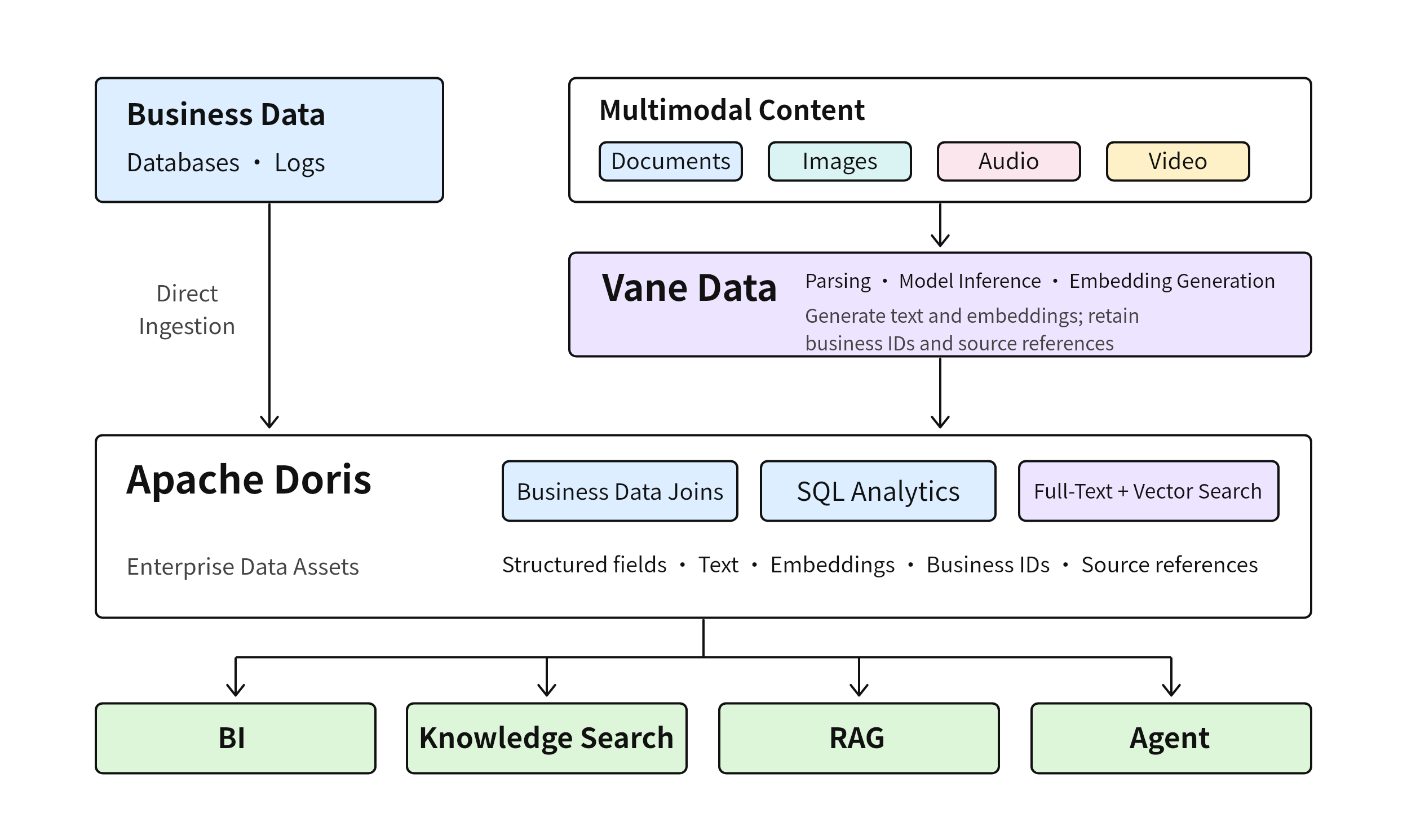
Vane brings SQL, Python UDFs, and AI functions into a single dataflow, coordinating execution and data transfer so that business identifiers, source references, and processing results remain linked throughout processing. Its pipeline also coordinates data reading, decoding, model inference, and result handling, enabling multimodal processing to run reliably and continuously.
After Vane transforms documents, images, audio, and video into text, structured fields, and embeddings, the results are written to Doris, where they are combined with business data such as orders, support tickets, customers, and production batches.
The following example uses equipment support call recordings to show how a recording becomes data that can be queried in a business context. The code is primarily excerpted from the Vane + Doris Customer Support Recording Search Tutorial. The excerpts below use the English tutorial's recordings and category values.
From Support Call Recordings to Business Analytics: Doris + Vane in Practice
The walkthrough follows this sequence: create tables in Doris → process and load data with Vane → query and analyze the data in Doris.
Prepare Tables and Indexes in Doris
First, create the target table in a Doris SQL client. The feedback_segments table stores text, provisional classifications, 384-dimensional embeddings, and source locations for each recording segment, along with the ticket ID, product model, and date. The text inverted index supports keyword filtering, while the approximate nearest neighbor (ANN) index supports subsequent approximate vector search.
Doris SQL | Create the Recording Segment Table and Indexes:
-- Run in Doris: create a results table with one record per recording segment.
CREATE TABLE vane_support_demo.feedback_segments (
    ticket_id VARCHAR(64) NOT NULL,
    segment_id INT NOT NULL,
    -- Product model and date define the scope of business queries.
    product_model VARCHAR(64),
    event_date INT,
    -- Store the transcript, provisional AI classification, and a separate review status.
    -- Set the review status to pending when loading the data.
    text STRING,
    fault_category VARCHAR(64),
    review_status VARCHAR(32),
    -- Retain the original recording path and segment start/end times in milliseconds
    -- so that retrieved segments can be replayed for verification.
    source_uri STRING,
    start_ms BIGINT,
    end_ms BIGINT,
    embedding ARRAY<FLOAT> NOT NULL, -- Matches the 384-dimensional output of ai_embed.
    -- Use the inverted index for text filtering.
    INDEX idx_text(text) USING INVERTED PROPERTIES("parser" = "english"),
    -- HNSW uses L2 distance. The index dimension must match the model output
    -- and the ingestion configuration.
    INDEX idx_embedding(embedding) USING ANN PROPERTIES(
        "index_type" = "hnsw", "metric_type" = "l2_distance", "dim" = "384"
    )
) ENGINE=OLAP
DUPLICATE KEY(ticket_id, segment_id)
DISTRIBUTED BY HASH(ticket_id) BUCKETS 1
PROPERTIES("replication_num" = "1");
Next, prepare the tables that link the business records: ticket_orders maps support tickets to orders, and orders records the production batch associated with each order. This example uses the tutorial's sample data, which assumes that each ticket corresponds to one order and each order to one production batch. In a production deployment, these relationships can use existing business tables in Doris.
For the DDL and sample data for the other business tables, see Section 2 of the tutorial, “Create Tables and Indexes in Doris.”
Use Vane to Transform Recordings into Searchable Data
Ingest Recordings and Link Ticket Information
The recordings and ticket information form the initial pipeline input. Vane can manage file references directly, keeping the files and business metadata, such as ticket IDs and product models, in the same dataflow:
Vane SQL | Ingest Recordings and Ticket Data (Excerpt):
-- Run in Vane: combine a file reference and ticket metadata in the same record.
WITH files AS (
    SELECT
        ticket_id,
        product_model,
        event_date,
        -- FILE holds the file reference. Convert it to the AUDIOFILE type
        -- accepted by the transcription UDF.
        audio_file(
            file(f.url, NULL, NULL, NULL, NULL)
        ) AS audio
    -- List the recordings; audio content is read during the later transcription step.
    FROM list_files('./recordings/*.wav') AS f
    -- The ticket list supplies the product model and date; ticket_id should be unique.
    JOIN read_csv('tickets.csv', header = true) AS t
      -- Extract T1024 from T1024.wav and match it to the ticket ID.
      -- Unmatched files are excluded from the results.
      ON regexp_extract(f.url, '([^/]+)\.wav$', 1) = t.ticket_id
)
SELECT
    ticket_id,
    product_model,
    event_date,
    audio
FROM files;
Here, raw files enter the processing pipeline with their business context attached from the outset. Transcription, information extraction, and embedding generation can then continue along the same dataflow.
Transcribe Recordings and Preserve Segment Timestamps
For audio recordings, transcription can preserve segment timestamps as well as generate text. This makes it possible to locate the relevant passage in the original recording when a piece of feedback is retrieved:
Python UDF | Transcription Model (Transcription Implementation and Registration Omitted):
# Define a batch UDF in Vane.
@vane.cls.batch(actor_number=1, gpus=0, return_dtype="VARCHAR")
class SpeechRecognizer:
    # Load the model when each actor is initialized; reuse the instance for later batches.
    def __init__(self, model_name):
        from faster_whisper import WhisperModel
        self.model = WhisperModel(
            model_name,
            device="cpu",
            compute_type="int8"
        )


    # Accept a batch of AUDIOFILE values. The full implementation returns an array
    # of JSON strings with one entry per input row.
    def __call__(self, audios):
        # Transcribe the batch of AUDIOFILE values while preserving
        # the start and end times of each segment.
        # The JSON contains segment IDs, text, and start/end times in milliseconds.
        # Subsequent SQL expands the JSON into segment-level rows.
        # Implementation and registration are omitted here; see the tutorial for the full code.
        ...
Extract Provisional Fault Categories and Generate Text Embeddings
The transcription results can then be processed further as SQL data. For example, provisional fault categories can be extracted from the text:
The prompt constrains the JSON field and the set of allowed categories, and instructs the model to preserve uncertainty when the evidence is insufficient:
Vane SQL | Provisional Fault Classification (Excerpt):
-- Run in Vane; segments comes from the preceding transcription and segment expansion steps.
SELECT
    ticket_id,
    segment_id,
    text,
    -- Extract a provisional category for each segment, restricting the JSON field
    -- and allowed values to match the English tutorial data.
    ai_prompt(
        'Extract the fault category using only the support call segment below. '
        || 'Return only a JSON object with the key fault_category. '
        || 'The value must be one of: cannot_start, general_inquiry, other_fault, pending_review. '
        || 'Do not treat negated or hypothetical descriptions, or descriptions of issues resolved '
        || 'after repair, as confirmed faults. If the evidence is insufficient, use pending_review. Segment: ' || text,
        provider := 'openai',
        model := '...', -- Replace with a text model ID available to your account.
        -- Raise an exception if the model call fails, rather than treating the failure
        -- as a valid classification.
        on_error := 'raise'
    ) AS fault_json
FROM segments;
After JSON validation and category normalization, the classifications are loaded as provisional labels that still require review. If validation fails or a category falls outside the allowed set, it is assigned “To be confirmed” (pending_review).
Vane can also generate an embedding for the same text:
Vane SQL | Text Embedding Expression (Excerpt):
-- Excerpt from a SELECT expression in Vane: generate a semantic embedding of the transcript.
ai_embed(
    text,
    -- Use a Transformers model. New query text must use the same model and processing.
    provider := 'transformers',
    model := 'sentence-transformers/paraphrase-multilingual-MiniLM-L12-v2',
    -- Match the ingestion requirements for the Doris vector column and the ANN index dim.
    dimensions := 384,
    -- Normalize the vectors; use the same configuration for ingestion and querying.
    options := struct_pack(normalize := true)
) AS embedding
At this point, a recording has been transformed from a raw file into a set of fields ready for Doris: text, a provisional classification, an embedding, and the source reference and timestamps needed to locate the original content.
Load the Processed Results into Doris
Vane then uses DorisStreamLoadSink to invoke Doris Stream Load and write the processed results to Doris. For the ingestion code and connection settings, see Section 3 of the tutorial, “Process Recordings with Vane and Load Them into Doris.”
The loaded data includes text, provisional classifications, review status, embeddings, ticket identifiers, original file paths, and segment start and end times. Vane has now completed processing and ingestion; subsequent queries run in Doris.
Use Doris to Retrieve Feedback, Trace Business Relationships, and Analyze Issue Distribution
Run all of the following SQL statements in a Doris SQL client.
Retrieve Similar Feedback with Business Filters
Retrieve similar feedback. First, inspect the first nonempty segment of ticket T1024. Then reuse its embedding to find similar feedback from other tickets for the X1 model in September 2026. The query returns the sample text so that you can verify that the content being compared is appropriate.
Doris SQL | Retrieve Similar Segments with Business Filters:
-- Inspect the segment to be used as the query sample.
-- The search below uses the same selection criteria.
SELECT ticket_id, segment_id, text
FROM vane_support_demo.feedback_segments
WHERE ticket_id = 'T1024'
  AND length(trim(text)) > 0
ORDER BY segment_id
LIMIT 1;


-- Use the first nonempty segment of T1024 to find similar feedback in other tickets.
-- LIMIT 1 ensures that the query sample contains at most one row.
-- Reuse the stored embedding without calling the model again.
WITH query_feedback AS (
    SELECT ticket_id, segment_id, text, embedding
    FROM vane_support_demo.feedback_segments
    WHERE ticket_id = 'T1024'
      AND length(trim(text)) > 0
    ORDER BY segment_id
    LIMIT 1
)
-- Return both the sample and candidate text so that the comparison can be verified.
SELECT q.ticket_id AS query_ticket_id,
       q.segment_id AS query_segment_id,
       q.text AS query_text,
       f.ticket_id, f.segment_id, f.text, f.fault_category,
       f.source_uri, f.start_ms, f.end_ms,
       -- Compare the candidate embedding with the sample embedding.
       -- A smaller L2 distance indicates greater similarity.
       l2_distance_approximate(f.embedding, q.embedding) AS distance
FROM vane_support_demo.feedback_segments f
CROSS JOIN query_feedback q
-- Search only within the specified product model and date range.
WHERE f.product_model = 'X1'
  AND f.event_date >= 20260901 AND f.event_date < 20261001
  -- Exclude every segment of the sample ticket to avoid matching it against itself.
  AND f.ticket_id <> q.ticket_id
-- Sort by distance first, then by ticket ID and segment ID to break ties.
ORDER BY distance ASC, f.ticket_id, f.segment_id
-- Return up to 3 segments; the same ticket may appear more than once.
-- Similarity does not mean that a fault has been confirmed.
LIMIT 3;
A smaller distance indicates that the vectors are closer. The query returns up to three segments, and more than one segment may come from the same ticket. To also require the original text to contain “indicator light”, add AND f.text MATCH_ANY 'indicator light' at the end of the search query's WHERE clause, before ORDER BY, to combine text matching with vector ranking.
Join Orders and Production Batches to Trace Feedback
Join orders and production batches. Starting from the recording segment table, the query links segments to orders through support tickets, then identifies the corresponding production batches. LEFT JOIN preserves feedback that has not yet been matched to business records, making it easier to check data completeness.
Doris SQL | Join Orders and Production Batches:
-- Link recording segments to orders and production batches.
-- Retain unmatched records for inspection.
SELECT f.ticket_id, f.segment_id, f.text, f.fault_category,
       t.order_id, o.production_batch,
       -- Retain the original recording location to trace business records back to evidence.
       f.source_uri, f.start_ms, f.end_ms
FROM vane_support_demo.feedback_segments f
-- Find the order by ticket ID. LEFT JOIN retains unmatched records with NULL fields.
LEFT JOIN vane_support_demo.ticket_orders t ON f.ticket_id = t.ticket_id
-- Find the production batch by order ID; the tutorial assumes one batch per order.
LEFT JOIN vane_support_demo.orders o ON t.order_id = o.order_id
-- Query all segments within the specified business scope.
WHERE f.product_model = 'X1'
  AND f.event_date >= 20260901 AND f.event_date < 20261001
ORDER BY f.ticket_id, f.segment_id;
In the sample data, T1024 and T1025 are linked to O9001 and O9002, respectively, both of which belong to batch B202608. T1026 is linked to O9003 in batch B202609. These relationships come from the business tables. The query also retains the original file path and millisecond timestamps for playback and verification; source_uri identifies the source path.
Aggregate Candidate Tickets by Batch to Support Quality Investigations
Analyze the distribution of candidate tickets by production batch. The following query filters the full segment table for X1 records from September 2026 that the AI classified as “Unable to start” (cannot_start), deduplicates them by ticket, joins them to production batches, and counts the tickets. Its scope is independent of the earlier top-three search results and provides batch-level leads for manual investigation.
Doris SQL | Count Candidate Tickets by Production Batch:
-- Aggregate candidate tickets classified by AI as "Unable to start" by batch.
WITH candidate_tickets AS (
    -- A ticket may have multiple matching segments; first deduplicate to a set of tickets.
    SELECT DISTINCT ticket_id
    FROM vane_support_demo.feedback_segments
    WHERE product_model = 'X1'
      AND event_date >= 20260901 AND event_date < 20261001
      -- Include a ticket if AI labels at least one segment "Unable to start".
      -- Human confirmation is not required for inclusion in this candidate set.
      AND fault_category = 'cannot_start'
)
-- Group tickets without a linked batch separately so that they are not silently dropped.
-- The fallback label below means "No linked batch".
SELECT COALESCE(o.production_batch, 'NOT_LINKED_TO_BATCH') AS production_batch,
       -- Count distinct ticket IDs: this is a candidate ticket count,
       -- not a segment count or a failure rate.
       COUNT(DISTINCT f.ticket_id) AS candidate_ticket_count
FROM candidate_tickets f
-- Follow the ticket-to-order-to-production-batch relationships to obtain the batch.
LEFT JOIN vane_support_demo.ticket_orders t ON f.ticket_id = t.ticket_id
LEFT JOIN vane_support_demo.orders o ON t.order_id = o.order_id
-- Aggregate by batch and show batches with more candidate tickets first
-- to support subsequent manual investigation.
GROUP BY COALESCE(o.production_batch, 'NOT_LINKED_TO_BATCH')
ORDER BY candidate_ticket_count DESC, production_batch;
candidate_ticket_count is the number of candidate tickets with at least one segment classified by AI as “Unable to start” (cannot_start). If no records have this category, the query returns an empty result set.
In this pipeline, Vane transforms recordings into data ready for ingestion, and Doris connects the processed results to support tickets, orders, and production batches. From retrieving similar feedback and tracing business relationships to aggregating potential issues by batch, multimodal information becomes part of the same SQL query and analytics workflow.
Doris + Vane in Practice at a Manufacturing Enterprise
A manufacturing enterprise uses Doris as its unified platform for real-time analytics, bringing together production, quality inspection, equipment, and after-sales data to support production line monitoring, yield analysis, batch traceability, and fault statistics. As AI becomes more deeply integrated into business operations, the enterprise also needs to incorporate images, documents, and recordings into its existing data environment. Building on its real-time analytics capabilities, Doris adds full-text and vector search to support multimodal data retrieval and analysis for enterprise AI use cases. Combined with Vane as the multimodal data processing engine, this enables multiple AI applications.
- Process Anomaly Analysis: Connecting Yield Fluctuations to Lessons from Past Improvements
The enterprise brings process parameters, test results, equipment status, and batch information together in Doris to analyze yield trends in real time and drill down by process step, equipment, and shift. When yield drops at a particular process step, engineers also need to consult historical anomaly reports, 8D reports, and trial records to identify similar problems and effective corrective actions.
Vane parses these documents, extracts observed anomalies, parameter conditions, corrective actions, and validation findings, and generates text embeddings while preserving business identifiers, document versions, and page numbers. Once the results are written to Doris, hybrid keyword and vector search can find similar cases within constraints such as product and process step. These cases can then be linked to parameter distributions for the current batch, historical trials, and metrics from before and after the corrective actions.
As a result, anomalies detected through real-time analytics can be connected directly to prior troubleshooting experience. AI suggests investigative steps based on business data and documentary evidence, while engineers validate causes and corrective actions through trials. This reduces the work of searching across systems and cross-checking parameters, shortening the investigation process.
- After-Sales Quality Analysis: Connecting Customer Descriptions to Product Operating and Manufacturing Data
The enterprise uses Doris to analyze after-sales support tickets, product fault codes, operating records, and production batches for fault statistics and product traceability. As AI becomes more embedded in after-sales operations, customer descriptions in recordings, text, and photographs also need to be included in the analysis. For example, determining whether “it won't charge” and “charging stops halfway through” describe the same type of issue requires reference to actual operating conditions.
Vane transcribes recordings, parses attachments, extracts reported symptoms and provisional categories, and generates embeddings while retaining ticket IDs, original images, or recording timestamps. Doris combines product model, time, and fault keywords in hybrid search, then joins similar feedback to product operating records, repair outcomes, and production batches. It analyzes the distribution of issues after deduplicating by ticket or product.
Customer feedback thus becomes part of the existing quality analytics framework. Business users can review the original evidence and determine whether similar issues are concentrated in particular batches or operating conditions. This helps identify clusters of quality issues earlier and shortens the path from customer descriptions to production traceability and assessment of the affected scope.
Conclusion
The value of multimodal AI extends beyond retrieving recordings, images, and video. It lies in connecting the information they contain to customers, orders, support tickets, and production batches so that it can contribute to further business analysis.
Vane turns raw content into computable data; Doris brings that data into business workflows. Starting with a specific use case and integrating one type of multimodal data into the existing data environment allows teams to progressively build an end-to-end pipeline from content understanding and semantic search to business analytics.
Put the information in your files to work as data that can be searched, joined, and analyzed. Start with one type of real-world data and explore Doris and Vane together. Follow the Customer Support Recording Search Tutorial to reproduce the scenario in this article, read the Quickstart Guide, and visit Vane on GitHub to share your use cases and feedback.